At WWDC 2025, Apple did something it rarely does: it backtracked.
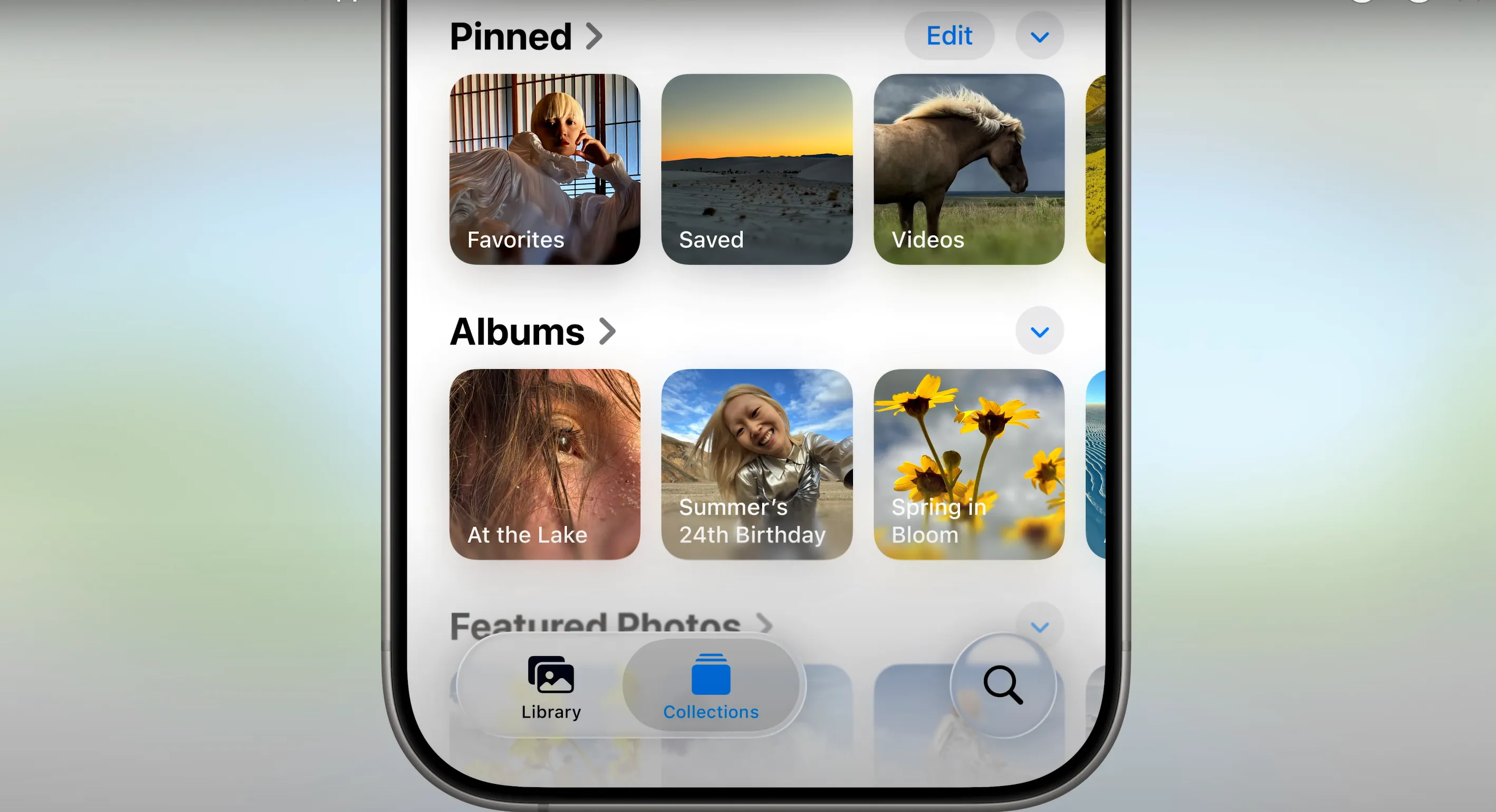
In a moment of quiet humility during the iOS 26 segment, Craig Federighi acknowledged — in his own Apple-ish way — that the redesign of the Photos app in iOS 18 didn’t go as planned. “Many of you missed using tabs in the Photos app,” he said, delivering what might be the closest Apple has come to an actual apology. With iOS 26, the Photos app is finally getting a usability-first refresh — and it’s the best kind of fix: one that simply makes sense.
iOS 26 Photos App Redesign: A Return to Sanity

Let’s be blunt — iOS 18’s Photos app was a UX mess. It split the screen awkwardly, buried your albums, and confused muscle memory that had been built over a decade of use. In the name of modernizing, Apple accidentally made one of its most-used apps feel broken.
With iOS 26, Apple is pressing “undo.”

The Photos app tabs return, dividing the experience into two clean sections: Library and Collections. The Library tab is now full-screen — no more 60/40 claustrophobia — making it much easier to scroll through recent shots or scroll back in time. Meanwhile, Collections handles Memories, People, Places, and pinned albums — keeping curation neatly tucked away until you actually need it.
This isn’t innovation. It’s revision. And that’s okay. In fact, it’s necessary. Apple’s pivot here reflects a renewed respect for the muscle memory of its users. The company isn’t just fixing the Photos app — it’s fixing the friction.
ALSO READ: Apple Bets on Quality in the AI Race; Reson’s behind Siri Overhaul Delay Revealed
Camera App Redesign: New Layout, Familiar Purpose

While Photos is getting a return to form, the Camera app is being reimagined entirely. Gone is the static mode dial. In its place? A gesture-based interface that separates Photos and Videos into clear entry points.

Swiping left or right cycles through familiar shooting modes, like Portrait or Cinematic, while a new swipe-up gesture brings up granular settings such as flash, exposure, and timer options. It feels like a page out of Android’s playbook, but with that tight, deliberate Apple polish.
ALSO READ: Full List of iPhone Models Compatible with iOS 26 update

Apple believes this layout will make switching between photo and video modes smoother and faster. Time will tell whether this gesture-centric interface wins users over, but it certainly looks more intuitive on demo.
Apple’s Rare Admission: Listening to Feedback
The big story here isn’t just the return of tabs or the revamped Camera UI, it’s Apple listening. Historically, Cupertino has been hesitant to walk back major design decisions. Whether it was butterfly keyboards or controversial software choices, the company tends to iterate forward, not rewind.
But this Photos app redesign signals a shift. It shows that Apple is tuning in to user complaints and reacting quickly. The company waited just one year to course-correct the Photos debacle. That’s practically light-speed by Apple’s standards.
And the implications go beyond Photos. If Apple’s listening here, might it reconsider other controversial UI changes too? (Looking at you, Control Center.)
What It Means for iPhone Photography Workflows
For everyday iPhone users and mobile photographers alike, the Photos and Camera updates should reduce friction. You’re no longer juggling between a tight split-view just to view your images, and you can jump between modes or settings more fluidly when shooting on the go.
This is especially relevant with the upcoming iPhone 17 series, which will likely push Apple’s photography game further. When hardware and software align, the result is a better, more reliable experience, and that’s clearly what Apple is aiming for in iOS 26.
Bottom Line
iOS 26 might not have flashy AI gimmicks or moonshot features (at least not yet), but it does have something rare and powerful: humility. By fixing the Photos app and rethinking the Camera UI, Apple is telling its users, without explicitly saying so, “We hear you.”
In a world where software giants often double down on flawed design in the name of progress, that message matters.
And in typical Apple fashion, it’s delivered not with fanfare, but with a wink: the return of a tab.
You can follow Smartprix on Twitter, Facebook, Instagram, and Google News. Visit smartprix.com for the latest tech and auto news, reviews, and guides.