Intel Unison lets you connect your PC to iOS and Android phones

Main Image
  • Like
  • Comment
  • Share

One of the largest chipmakers in the world, Intel launched its next-gen Intel 13th-Gen Raptor Lake desktop CPUs a few days ago. What’s interesting is that Intel has launched a new cross-platform collaboration tool dubbed Intel Unison that allows users to connect their PC with their iOS or Android phones alike. Here’s more information that you can wrap your head around to know about it better.

Intel Unison lets you connect your Android/iOS phone to the PC

Built on Screenovate, an Israeli startup that launched Dell Mobile Connect, the Intel Unison lets you connect your Android or iOS devices to the PCs powered by 13th Gen Intel Raptor Lake processors as well as a few Intel Evo 12th Gen processors.

Intel Unison lets you connect your PC to iOS and Android phones

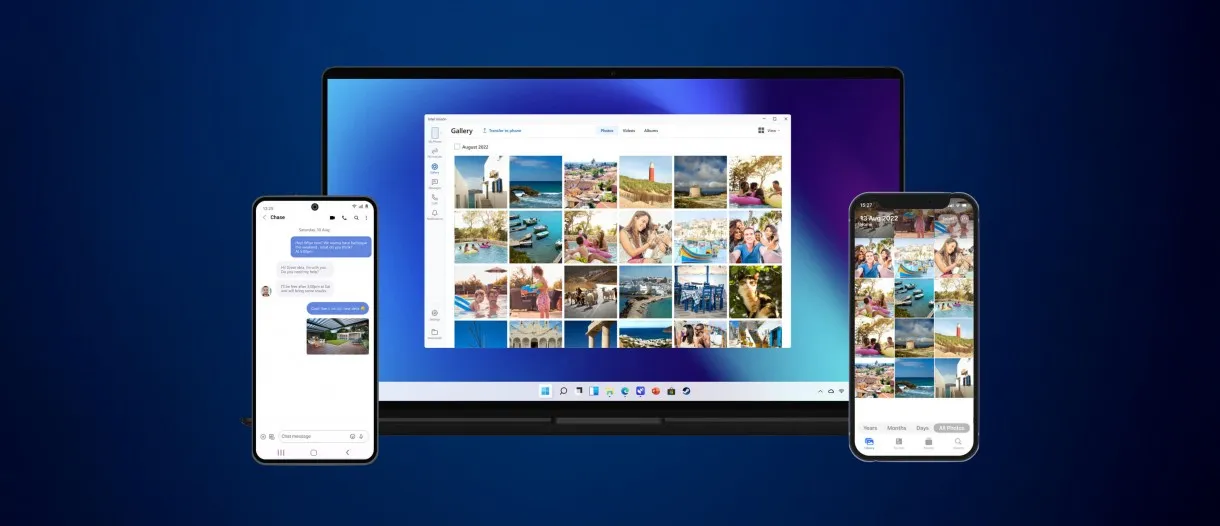
The tool allows users to make phone calls, send and receive SMS, transfer documents, drag and drop photos, receive notifications and you name it. It even lets you use the mouse, keyboard, and touchscreen of your PC to control the same. Although it does appear to be similar to Microsoft’s Phone Link (or Your Phone), it offers functionalities across both iPhones and Android systems, unlike Microsoft’s solution.
Intel Unison lets you connect your PC to iOS and Android phones

All it uses is Bluetooth or the WiFi from your phone to connect and bingo, you can certainly bid adieu to your phone (at least for some time) now that your PC has all the things your phones can do. Intel is working with the laptop makes in order to optimize the feature allowing it to have higher reliability, and maximum battery life even when connected over Bluetooth or Wi-Fi where both are power-hungry features.

The software will be initially available pre-installed, however, the chipmaker has mentioned that it will release the tool as a direct download option too. As mentioned, the feature is available across all the 13th Gen Raptor Lake desktop CPUs from Intel that will make their way through sometime early next year. For those using the aforementioned Intel Evo 12th Gen desktop CPUs, the feature will be rolled out as early as this year across offerings from Lenovo, HP, and Acer.


Related Articles

ImageOppo Find X10 Pro Max Finally Gets Its Optimized Blackmagic Camera App

Phone makers use the phrase “cinema-grade” too loosely, and too frequently, I’d say. The software is where the claim holds up (if it does at all). One Oppo flagship has spent weeks preparing for exactly that test, and this week, it finally faced the examination. Also Read: Car Prices Are Climbing Again Before Year-End: Maruti, Hyundai, …

ImageIntel launches 13th Gen Raptor Lake Desktop CPUs for Gamers & Creators: Read on to know more

Intel has announced the 13th Gen Core CPU lineup called the ‘Raptor Lake’ desktop CPUs which are high-end models made for gamers and creators. Intel claims that it has come up with the world’s fastest desktop processor that has a flagship core i9-13900K. It clocks a speed of 5.8GHz and has 24 cores-8 of which …

ImageSamsung Display working on slideable PCs in collaboration with Intel

Samsung made an impact in the industry with the launch of the foldable display. Now, Samsung Display and Intel are developing a slideable PC. In the Intel Innovation keynote, Samsung Display CEO JS Choi made an appearance on stage to unveil the prototype PC that can transition from a 13-inch tablet to a 17-inch display …

ImageGoogle Quick Share SDK Coming to Android and iOS Apps in 2027

Google announced the Quick Share SDK at the Android Dev Summit 2026. The new SDK will let developers integrate the company’s peer-to-peer sharing system directly into their apps, allowing users to send files without leaving the app to open the system share sheet or the full-screen Quick Share interface. Google is also bringing the SDK …

ImageHow to Turn Any GIF Into an Animated WhatsApp Sticker in 10 Seconds on Android and iPhone

WhatsApp lets you turn GIFs into animated stickers and share them directly in your chats. You can use your phone’s keyboard, WhatsApp’s built-in sticker editor, or a third-party tool to create stickers from GIFs you already have. The process takes only a few seconds once you know where to look. Here’s how to do it …

Discuss

Be the first to leave a comment.