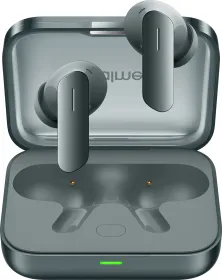
The mid-range true wireless earbuds space is deceptively crowded. Many products promise heavy specs, long lists of features, and impressive performance. In real use, however, most fall short in one or two meaningful areas. The realme Buds Air 8 seem quite appealing because they deliver strong active noise cancellation, a well-tuned transparency experience, and practical features that you’ll use daily.
After spending extended time with them during calls, music listening, and outdoor walks, gym, the strengths of these earbuds became clear without much effort. Let’s take a closer look in this review.
realme Buds Air 8 Price & Availability
The realme Buds Air 8 are priced at ₹3,599 in India. They are available in Gold, Dark Grey, and Purple, and can be purchased through realme’s official store, Flipkart, Amazon, and major retail outlets. We have the Dark Grey version with us.
Pros
- Likeable sound tuning
- Feature-packed
- Solid connectivity and triple connection
- Good battery life
- Has 6-band EQ options
- ANC is best in class
Cons
- The case design is awful
- You cannot use the realme Link app without signing in
- realme Link app has ads
realme Buds Air 8 Review: Sound

The realme Buds Air 8 comes with a dual driver setup: 11mm + 6mm. Out of the box, the default sound profile on the Buds Air 8 feels overly boosted and imbalanced. Bass is loud, volume feels exaggerated, and mids get pushed back. This is not a tuning most listeners will enjoy for extended sessions.
Changing a few settings transforms the experience. Turning off Volume Enhancer, switching to LHDC, and selecting Original Sound brings much better balance. Bass tightens up, the mid-range opens properly, and vocals feel clearer. The volume is still loud so don’t listen at higher volumes.
The inclusion of a 6-band EQ offers the flexibility to fine tune the output further, making these buds adaptable to personal taste. This is not reference-level audio, but it is enjoyable, well balanced, and comfortable for long listening sessions once dialed in with the settings I mentioned earlier.
realme Buds Air 8 Review: Design and Fit

The design of the Buds Air 8 is noticeably different from the Buds Air 7, and not all of those changes feel like an improvement. realme has collaborated with a well known designer for this generation, and the intent is clearly to make the earbuds feel more refined and premium. In practice, the execution feels mixed.
The charging case retains a familiar overall shape, but the finish has changed. The surface has a leather style texture with a more understated, muted look. The realme logo is placed on the inside of the case, and there is a designer signature too. An LED indicator sits on the front, while the USB Type-C port is placed at the back for charging. The pairing button is located inside the case.

The biggest issue with the case is usability. It is simply hard to open, especially with one hand. The hinge feels stiff, and the lid does not flip open easily. This becomes frustrating over time, particularly when you are quickly taking the earbuds in and out throughout the day. Compared to the Buds Air 7, which were much easier to handle, this is surely a step backward.


The earbuds themselves are better executed. The stem design looks clean, with a flat outer surface that gives them a modern appearance. The touch sensitive areas are responsive and pick up gestures reliably. The magnets inside the case are strong, and the earbuds snap into place securely. It’s IP55-rated so you don’t have to worry about sweat or water splashes.

In terms of comfort, the fit remains good. The earbuds sit securely in the ear and work well for long listening sessions, commuting, and workouts. The dark grey color variant looks subtle and understated, though the overall aesthetic does not stand out in a positive way.

Overall, while the design aims to feel more premium and design driven, the case in particular feels like a downgrade from the Buds Air 7. The harder to open lid hurts everyday usability, and the visual changes do not fully make up for that. The earbuds themselves are well designed, but the case design holds the overall experience back.
realme Buds Air 8 Review: App and Features

The realme Buds Air 8 rely entirely on the realme Link app for control and customization, and this is easily the weakest part of the overall experience. The app forces you to sign in with a realme account before you can access even basic features.
If you want to change ANC modes, disable Volume Enhancer, switch to LHDC, enable game mode, or adjust button controls, the app is mandatory. This requirement feels unnecessary and adds friction right at the start.
The presence of ads inside the app is also disappointing. For a product positioned in the mid range segment, this is not something you would expect while adjusting core audio features. It breaks the flow and makes the experience feel less polished than it should be.

Once you get past the login and ads, the app itself is actually usable. Navigation is clear, settings are logically grouped, and nothing feels hidden. Noise control options include Smart, Max, Moderate, and Mild. In regular use, Max works best and delivers consistent results without discomfort. There is also a dedicated wind noise reduction toggle, and it works very well in outdoor conditions.
Transparency mode includes an Enhance Voices option, and this feature is genuinely useful. Ambient noise is reduced while voices are amplified clearly, which makes conversations easy without removing the earbuds. I found this especially helpful in the gym and other busy environments.
There is also a standard transparency mode and a full off mode if you prefer no processing. Throughout all modes, there is no pressure sensation, which helps during long listening sessions.

Sound customization is fairly good. The default tuning is set to Clear Bass, which I would not recommend. Switching to Original Sound improves balance significantly. LHDC should be enabled for the best audio quality, and Volume Enhancer should be turned off since the earbuds are already loud by default.
There is also a Dynamic Audio option that allows manual adjustment of low, mid, and high frequencies from -5 to +5. This is best left untouched unless you know exactly what you are doing. Original Sound with minor EQ tweaks works best.

The app also includes spatial audio, though it does not add much value here and is easy to skip. Button customization is good. Each earbud supports double tap, triple tap, and touch and hold gestures.

You can assign play or pause, next track, volume up or down, voice assistant, game mode, Ask AI, face to face translation, and live translation. The flexibility is good, though I wish there was single tap and swipe based volume control too.

AI features are included and work as advertised. Face to face translation allows one person to wear the earbuds while the other initiates translation from the phone. Only the other person’s voice is translated through the earbuds, which keeps the experience clean.

Live translation is also supported, and you can assign quick actions to trigger these modes. Ask AI works through a press and hold gesture and provides spoken responses for basic queries. It’s better to just use Gemini.

Additional features include Mind Flow mode with ambient background sounds, game mode for reduced latency, triple device connection, auto play and pause, earbud usage tracking, find my phone, and firmware updates.

Triple device connection really stands out here. You can connect to three devices at once and switch between them seamlessly, which has been extremely useful for me. It’s easily one of the best features of the realme Buds Air 8.

Overall, the feature set is strong and well thought out. The real issue lies with the app experience itself. Forced login and intrusive ads take away from what is otherwise a capable and flexible control system.
realme Buds Air 8 Review: Microphones and Calling

Call quality on the Buds Air 8 is solid for the price. The microphones pick up voices clearly in most environments, and background noise reduction helps maintain clarity during calls. Wind noise suppression performs well for this segment, which is noticeable during outdoor use. In very noisy settings, it starts to struggle for sure.
realme Buds Air 8 Review: Connectivity

Bluetooth 5.4 keeps the connection stable with minimal dropouts. Pairing is straightforward, and the earbuds reconnect quickly when taken out of the case. Triple device switching works reliably after setup. There’s also a game mode that helps reduce sync lag during gaming or even video playback.
realme Buds Air 8 Review: Active Noise Cancellation

This is the highlight of the realme Buds Air 8. On paper it’s rated for up to 55 dB of noise cancellation. Low-frequency noises like traffic rumble, engine sounds, and air conditioning are significantly reduced. Mid-range environmental sounds are dampened enough that they do not demand your attention. Unlike some ANC implementations that induce a heavy pressure sensation, the Buds Air 8 maintains comfort over long listening sessions.
Transparency mode is very well executed for the price. The Enhance Voices feature works as advertised, amplifying speech clearly while keeping ambient noise manageable. Conversations feel natural without the hollow or artificial tone that some transparency implementations deliver.
Wind noise reduction is also very good. While walking outdoors or dealing with windy conditions, it helps a lot. This makes both calls and transparency mode more usable outside.
realme Buds Air 8 Review: Battery and Charging
Battery performance on the Air 8 is quite good. Each earbud houses a 62 mAh battery, while the charging case packs a 530 mAh cell. With ANC turned on, LHDC enabled, and volume set between 30 to 50 percent, the earbuds last up to 6 hours on a single charge. With ANC turned off and the AAC codec, playback improves to around 8 hours. With ANC turned on and AAC enabled, the earbuds can reach up to 14 hours.

Total playback with the charging case is rated at up to 58 hours with AAC and ANC turned off. With ANC enabled and AAC in use, total battery life drops to around 30 hours. With both LHDC and ANC enabled, total playback is around 21 hours. In regular use, this comfortably translates to several days of listening without frequent charging. realme also claims that the battery can retain up to 80 percent health even after 1,000 charging cycles.

Charging the earbuds takes roughly two hours with the case and roughly one hour without the case. There is support for quick charging, so you can get hours of playback within a few minutes or charging as well. Wireless charging is not supported, which is expected at this price.
Review Verdict: Should You Buy the realme Buds Air 8?
The realme Buds Air 8 deliver a compelling mid-range experience. Noise cancellation is strong, transparency mode with enhanced voices works very well, and wind reduction improves real world usability. Sound quality improves significantly after basic setup adjustments, and the 6-band EQ provides meaningful control. This is the TWS most people should get.
The realme Link app requirement and default sound tuning are small inconveniences, but they do not overshadow the overall experience. For those who want great ANC, balanced sound after tuning, and great battery life, the realme Buds Air 8 are among the best options in this segment.

Smartprix ⭐ Rating: 8.3/10
- Sound: 8/10
- Design and Fit: 6/10
- Apps and Features: 9/10
- Microphones: 8/10
- Connectivity: 9/10
- Noise Cancellation: 9/10
- Battery and Charging: 9/10
First reviewed in January 2026.
You can follow Smartprix on Twitter, Facebook, Instagram, and Google News. Visit smartprix.com for the latest tech and auto news, reviews, and guides.