Quick Verdict — Score: 7 / 10 · Recommended
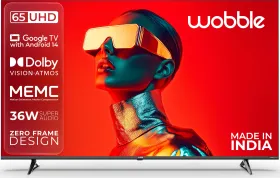
The Wobble 65-inch K-Series is a budget 4K TV that knows exactly what it is. At ₹39,999, it trades high-end gaming specs and deep, premium contrast for the things most households actually care about: a massive 65-inch screen, unexpectedly loud 40-watt audio, and a clean Google TV interface. It is a highly practical, high-value upgrade for casual streaming and live sports, provided you wall-mount it from day one.
Buy it if: You want the biggest screen for everyday streaming, Live sports are a priority and you want ou want clean Google TV 5.0 (Android 14).
Skip it if: You own a PS5 or Xbox Series X and You are a dark-room cinephile.
| I have a clear image of exactly who should buy the Wobble 65-inch K-Series 4K TV. It is the household that has been watching a 40-inch LED for the last half-decade and finally wants a massive, cinematic upgrade for the IPL season and daily family viewing without spending a fortune. At a street price of Rs 39,999, this is currently one of India’s most affordable 65-inch 4K Google TVs. Finding a reliable 65-inch smart TV under Rs 40,000 in 2026 is genuinely difficult. Legacy brands simply do not offer 65-inch panels in this bracket, and even aggressive new startups like Lumio don’t offer anything above 55-inches. The Wobble K-Series steps directly into this gap, offering a massive canvas, Dolby Vision support, and a modern Google TV 5.0 interface. But should you buy it? Let me share my thoughts on the Wobble K-Series 65-inch tv in our full review. |
HOW I TESTED
| Reviewer: Karan Sharma, Tech Expert (3 years experience, 50+ reviews). Test Unit: Wobble K Series 65-inch (WB65UDAGU2875D25) Provided by Indikal for review—no commercial arrangement. Duration and Environment: 14 continuous days that include daily-use viewing, reference testing sessions, and extended gaming. Competitors: iFFALCON U65 65-inch and Motorola Envision X 65-inch. |
Pros & Cons
Pros
- Large, bright screen
- Punchy, vibrant colors
- Clean Google TV
- Loud 40W audio
- Slim, modern bezels
Cons
- Grey black levels
- No local dimming
- Only 60Hz refresh
- Sluggish 2GB RAM
- Narrow sound stage
Wobble K-Series 65-inch TV Review: Picture Quality
For a budget 4K TV, the Wobble K-Series prioritizes exactly what most households want: a bright, vibrant picture that holds up well in a normally lit living room. It does not have the advanced hardware required for deep cinematic blacks, but for streaming daily YouTube content, watching live cricket, and putting on a weekend Bollywood film, the picture is genuinely good for the price.
Vibrant Colors for Animation and Casual Streaming
To see where the TV’s energy lies, I started my testing with Spider-Man: Across the Spider-Verse on Netflix. With its deliberately hyper-saturated comic-book palette, the Wobble K-Series looked spectacular. The panel delivers punchy reds, saturated blues, and bright highlights that make animated content pop. If your family watches a lot of superhero films or colorful content, this display will easily exceed your expectations right out of the box.
Best SDR Picture Settings for Indian Content
Like most budget TVs, the default “Standard” picture mode is a bit too cool and blue for serious viewing. However, the fix takes exactly five seconds: switch to Cinema mode.

Cinema mode transforms this TV from aggressive to highly accurate. I tested this using Panchayat Season 3 on Amazon Prime Video, a show known for its warm, hazy agricultural lighting. In Cinema mode, skin tones looked correct, and the muddy fields looked natural rather than artificially rendered. It also cleanly handled the muted, low-saturation 1990s color grading of Scam 1992 on SonyLIV without trying to artificially boost the dull office lighting. For your daily SDR streaming, just set the TV to Cinema mode and leave it there.
Dark Room Performance: The Contrast Compromise
The limits of a Rs 39,999 LED panel become apparent when you turn off the lights to watch a dark movie. Because the TV lacks local dimming, the backlight bleeds into the panel uniformly.

When testing the famous interrogation scene in Christopher Nolan’s The Dark Knight the black levels looked more like a lifted dark grey. This is an honest, hardware-level constraint of budget LED technology in 2026. It is important to note that this is not a Wobble-specific failure; rival TVs like the iFFALCON U65 have the exact same category limitation.
If you primarily watch daytime television, IPL matches, or family shows in a lit room, you will never notice this grey-black lift. It only matters if you are a cinephile trying to watch dark, moody films in a pitch-black room.rate, and well-proportioned. Watching a 1080p Blu-ray rip of Dangal, the earthy dust of the Haryana wrestling pits felt textured and real, proving this panel can handle subtle, desaturated color palettes beautifully once it’s taken off its factory leash.
HDR and Dolby Vision Performance
When evaluating HDR on a budget smart TV, it is crucial to set realistic expectations. This television is built for vibrant, everyday viewing rather than reference-level mastering. To understand what this panel can actually do, I measured its peak brightness and tested it across various Dolby Vision and HDR10 streaming titles.
The 400-Nit Brightness Ceiling

During my testing, I measured approximately 400 nits of peak brightness on the Wobble K-Series. It is important to know that this is the absolute brightness ceiling of the Rs 40,000 TV category right now, both the iFFALCON U65 and Motorola Envision X measure exactly the same.
Because true Dolby Vision content is mastered for 1,000 to 4,000 nits on a reference display, what you are getting on a budget TV is a tone-mapped approximation. It will be noticeably dimmer than a premium TV that costs twice as much. However, within those strict hardware limitations, the Wobble K-Series handles high-dynamic-range content remarkably well.
Vibrant Animation and Warm HDR10 Cinema

If you feed this panel the right content, it genuinely shines. I tested Marvel’s Doctor Strange in Dolby Vision Bright mode, and it was easily the best the Wobble K-Series looked during my entire two-week review period. The panel is built for this exact type of content: highly saturated, bright, and reliant on high contrast between vivid colors rather than deep shadows.

For live-action cinema, I queued up Dune: Part Two in HDR Cinema mode. The amber sunsets and desert sequences on Arrakis looked wonderfully controlled and warm. The color grading was not artificially crushed, and the sand tones looked natural rather than a harsh, rendered yellow. Budget panels have clearly improved, as this is the kind of HDR performance that would have required a Rs 55,000 television just two years ago.
The Best HDR and Dolby Vision Settings
To get the most out of this panel, you need to ignore some of the default presets. Here are the exact settings you should use on day one:
- For HDR10 Content (Prime Video, YouTube): Set the TV to HDR Cinema. This keeps the picture natural, controlled, and close to the director’s intent.
- For Dolby Vision Content (Netflix, JioHotstar): Use Dolby Vision Bright (DV Bright). This offers a highly reasonable compromise between visual punch and color accuracy in a normally lit living room.
- What to Avoid: Completely avoid Dolby Vision Dark (DV Dark) and DV Vivid. Despite its appealing name, DV Dark aggressively crushes shadow detail, while Vivid severely oversaturates the image.
Just like with standard HD content, the TV’s limitations only reappear when a scene requires true black depth. But if you stick to bright, colorful HDR content like modern superhero films, animation movies the Wobble K-Series delivers a highly enjoyable, saturated picture.
Upscaling
It is important to manage your expectations. An upscaling engine on a ₹39,999 TV is not going to magically transform a 720p cricket broadcast into pristine, reference-level 4K.
On movies like Anand and Dil Hai Ki Manta Nahi, the TV’s upscaling is similar to what you get from competitors. If you watch Airtel DTH or TataSky DTH from a normal viewing distance of six to eight feet on a living room sofa, the Wobble K-Series does what it needs to: it makes everyday HD streaming look natural, watchable, and pleasantly upscaled without drawing attention to the TV’s processing limits. However, if you sit too close to the 65-inch panel while watching standard-definition cable TV, the image will understandably look soft.
ALSO READ: Sony Bravia 9 Mini-LED Review (Long-term): The OLED Killer?
Wobble K-Series 65-inch TV Review: Gaming Performance
If you bought a PlayStation 5 or an Xbox Series X expecting lightning-fast 120fps gameplay, this is not the TV for you. The Wobble K-Series is equipped with HDMI 2.0b ports, which means the TV strictly caps your output at 4K/60fps.
There is no 120Hz mode, and more importantly, there is no Variable Refresh Rate (VRR). During my testing with God of War: Ragnarok on the PS5, minor screen tearing was visible whenever the frame rate dropped during heavy combat. At ₹39,999 for a massive 65-inch display, omitting HDMI 2.1 and a 120Hz panel is a standard budget constraint, not a Wobble-specific flaw. If you want to utilize your PS5 properly, you will need to look at the ₹60,000+ tier.
ALSO READ: LG OLED Evo AI G5 vs. Sony Bravia 9: Which Flagship Television Should You Choose?
Wobble K-Series 65-inch TV Review: Software & Hardware

The Wobble K-Series is equipped with just 2GB of RAM and 32GB of storage. What does this mean for daily use? It means you will encounter minor, liveable friction points. Opening an app like JioHotstar from a fresh boot takes about 3 to 4 seconds. Switching rapidly from Netflix back to Prime Video results in a brief UI lag before the screen settles.
Google TV is, without question, the best part of navigating the Wobble K-Series. The interface is clean, and the content discovery algorithms are genuinely useful. Unlike older Android TV interfaces that forced you to hunt through individual app libraries, Google’s cross-platform search aggregates content beautifully. Out of the box, the TV supports every major Indian streaming platform you actually need.
Additionally, the hands-free Google Assistant worked every single time I tried it. Being able to walk into the living room and simply ask the TV to play a specific YouTube video or turn off the screen is a premium feature that Wobble executed perfectly here.ssive.
ALSO READ: Sony BRAVIA Theater Bar 9 Review with Rear Speakers and Bass Module: Is It Worth the Price?
Wobble K-Series 65-inch TV Review: Design, Build, and Connectivity

Build Quality
From across the room, the Wobble K-Series genuinely looks like a premium product. Wobble has embraced a modern, edge-to-edge design, keeping the bezels impressively slim so that the screen cleanly fills the frame.
Walk closer, however, and the illusion fades. The rear chassis is constructed entirely of plastic, clearly communicating its budget manufacturing cost. While there is no concerning flex around the port array to suggest a durability issue, it simply feels like a budget television up close.
Remote Control
Matching the clean aesthetics of the TV, the included remote is highly practical and comfortable to hold. It pairs via Bluetooth meaning you don’t need a direct line of sight to the TV and includes dedicated hotkeys for Prime Video and other major streaming platforms.
Most importantly, it features a reliable, built-in microphone for Google Assistant. Being able to hold down a button and say, “Play Panchayat on Prime Video,” without awkwardly typing out the search query on an on-screen keyboard is a massive usability win for a TV at this price.
Wobble K-Series 65-inch TV Review: Audio
Budget TVs usually treat sound as an afterthought, but the Wobble K-Series’ 40-watt audio setup is a genuine surprise. For everyday television and live sports, it easily outperforms its price tag, even if it struggles with heavy cinematic scores.
During the India vs Pakistan T20 World Cup broadcast, the 40W speakers comfortably filled a 14 × 12 ft living room at just 60 percent volume. The commentary was clear, and the stadium crowd noise had noticeable depth audibly beating the rival iFFALCON U65’s 30-watt setup.
However, the limits of this audio setup become obvious during complex movie scenes. When testing the dense orchestral score in Dune: Part Two, the soundstage felt narrow and front-heavy. When background effects, heavy bass, and dialogue all overlap, the TV struggles to separate the finer audio details. Furthermore, pushing the volume above 70 percent introduces noticeable high-frequency distortion.
Review Verdict: Should You Buy the Wobble K-Series 65-inch TV?
I have tested a lot of budget TVs over the past decade, and the Wobble 65-inch K-Series is refreshingly honest about what it is. It is a product that does exactly what it promises, costs exactly what it says, and asks you to accept a few highly specific tradeoffs in exchange for a massive screen.
If your absolute maximum budget is ₹39,999 and you refuse to settle for a smaller 55-inch screen, this TV gets you exactly where you need to be. It delivers a modern Google TV 5.0 experience, punchy colors that make everyday Indian streaming look great, and built-in speakers that genuinely fill a room during a live cricket match.
What it will not do is satisfy hardcore PS5 gamers or dark-room cinephiles, and its 2GB of RAM means it might show its age faster than premium models. And, as I have advised throughout this review, you must factor an extra ₹2,000 into your budget for a proper wall mount, because the included table stand is not fit for purpose.
If you accept those compromises, the Wobble K-Series is a dependable, high-value centerpiece for an everyday living room.

Smartprix Rating: ⭐7 out of 10
- Design and Build: ⭐6.5/10
- Remote Control: ⭐6/10
- SDR Performance: ⭐8/10
- HDR Performance: ⭐6/10
- Audio: ⭐8/10
- Software:⭐7/10
- Value for Money: ⭐9/10
First reviewed in March 2026.
Frequently Asked Questions
What is the price of the Wobble 65-inch K-Series in India?
The street price for the Wobble 65-inch K-Series (model WB65UDAGU2875D25) is ₹39,999 as of March 2026. This makes it one of the most affordable 65-inch 4K smart TVs currently available in the Indian market.
Is the Wobble K-Series 65-inch good for PS5 gaming?
No, this television is not built to maximize current-generation consoles. Because it features a 60Hz panel and lacks Variable Refresh Rate (VRR), a PlayStation 5 will be strictly capped at 4K/60fps. If you own a PS5, you should save for a 120Hz display. However, for last-gen consoles like the PS4 or the Nintendo Switch, it performs perfectly well.
Which is better: Wobble K-Series, iFFALCON U65, or Motorola Envision X?
At the exact same ₹39,999 price point, each of these TVs caters to a specific buyer. The Motorola Envision X QLED is technically the strongest on paper due to its QLED display and 48W audio; if it is available in your city, it is the best buy. Between the Wobble and the iFFALCON, the Wobble wins decisively on audio volume (40W vs 30W), while the iFFALCON wins on physical stand stability and TCL’s wider after-sales service network.
Is the Wobble K-Series good for watching live cricket?
Yes, live sports are arguably this television’s absolute best use case. The panel gets bright enough to simulate that afternoon outdoor feel, and the standout 40W built-in speakers easily handle heavy stadium crowd noise and commentary.
What are the best picture settings for the Wobble K-Series?
To get the most accurate picture out of the box, use the following settings:
- For regular streaming: Use Cinema mode.
- For HDR10 content: Use HDR Cinema.
- For Dolby Vision: Use DV Bright.
- Crucial Tweaks: Strictly avoid ‘Dolby Vision Dark’ as it artificially crushes shadow details. Ensure MEMC (motion smoothing) and Dynamic Contrast are disabled when watching films.
Do I really need to wall-mount the Wobble K-Series?
Yes. The bundled table stand is among the least stable currently available on a 65-inch panel. For the safety of the television (and your household), wall-mounting it from day one is highly recommended. You can use the included fixed bracket, or invest ₹2,000 in a third-party articulating mount for better tilt flexibility.
Does the Wobble K-Series support Dolby Vision?
Yes, the panel fully supports Dolby Vision, HDR10, and HLG.
You can follow Smartprix on Twitter, Facebook, Instagram, and Google News. Visit smartprix.com for the latest tech and auto news, reviews, and guides.