How To Send SMS From PC With Google Android Messages Web Interface

Main Image
  • Like
  • Comment
  • Share

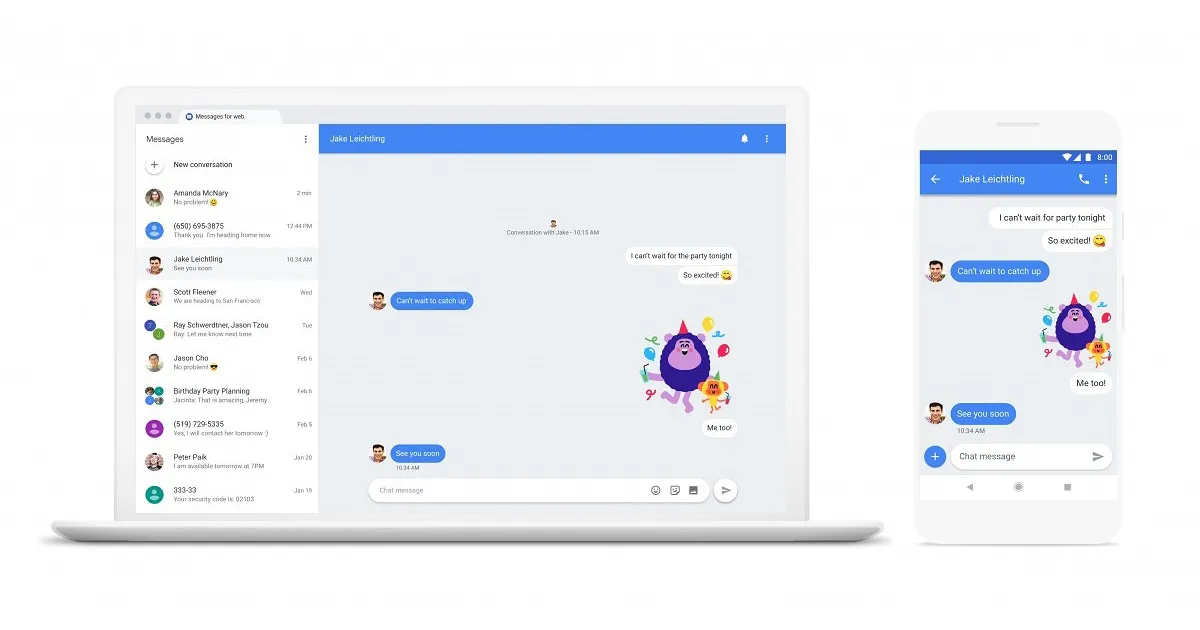
Google has added the ability for web access to its Android Messages App, which is to say that you can now monitor and send SMS from Messages using your desktop as well. The new feature supports a number of web browsers, including Google Chrome, Mozilla Firefox, Opera, Apple Safari, Microsoft Edge,  and works just like WhatsApp for Web service.

It will give a significant boost to Google Message, which comes pre-installed on millions of Android phones/ tablets. Google has started rolling out the update with version 3.3.043 and has also confirmed that the web version supports all text, images, and stickers.

Also Read: Jabra Elite 45e Wireless In-Ear Headset Launched in India

Here’s How To Send SMS From PC using Android Messages For Web

Step 1: Update your android Message app to the latest version, i.e. 3.3.043,  from Google Play Store. Most of you won’t see the new changes even after installing the update, so we suggest you wait for a few days.

Image Credit: Quinny899

Step 2: Open the app, and tap on the three-dots on the top-right corner to draw the options menu. Select Messages for Web from the shortlist and tap on “Scan QR Code”.

Step 3: Go to your preferred PC web browser and open the web interface. (https://messages.android.com)

Step 4: If you use the PC in which you are performing these steps frequently, you may want to toggle on “remember this computer” option.

Image Credit: Quinny899

Step 5: Scan the QR code shown on the PC’s screen using your phone, and you are good to go.

Image Credit: Quinny899

Step 6: You will immediately see a notification “Connected to Messages for web” once the setup is complete, and the list of signed-in computers in the “Messages for web” settings.

Also Read: How to identify Apps that are pushing pop-up ads on Android Phone?

How To Send SMS From PC With Google Android Messages Web Interface

The Google Android Message web feature lets you access all the elements of the mobile app on desktop’s browser. The list includes sending and receiving text messages, emojis, and images. Further, it should be noted that it is a front-end feature and your carrier tariffs will apply for sending messages.

Ashish KumarAshish Kumar
He is Journalism graduate, sports lover, and a passionate reader. Just like others his eyes is also filled with dreams and believes that one day those dreams will come true. Cheers!

Related Articles

ImageSamsung Might Add A Fourth Member To The Galaxy S27 Family With A 6.47-Inch Screen

Back in April, we heard about Samsung’s alleged plans to expand the Galaxy S27 lineup beyond three devices, with an all-new model called the Galaxy S27 Pro. However, concrete details about it were scarce at the time.  Also Read: Oppo’s Find X9s Lands in India with a 7,025mAh Battery and Triple 50MP cameras Galaxy S27 …

ImageBest text messaging apps for Android phones: SMS Organizer, Messages by Google and more

It may seem old-fashion to send text messages via SMS in the generation of instant messaging apps like WhatsApp, Telegram, or Facebook Messenger. Regardless, text messaging has its own place offering a bunch of services to mobile users. It is SMS which lets users connect with banking and different service providers’ solution like e-commerce updates, …

ImageWhatsApp Web login: How to make Whatsapp video call from PC or Laptop, Check WhatsApp Login, WhatsApp PC shortcut keys

The introduction of WhatsApp Web login has been a blessing for windows and mac users as it allows to get access to their favourite messaging service Whatsapp on their laptop or PC. If you are working on your PC/Laptop and don’t want to reach for your phone again and again in the middle of it, …

ImageGoogle Unveils The “Create My Widget” For Vibe-Coding Your Own Custom Widget In Android 17

At the Android Show 2026, Google announced something that wasn’t on my radar: a Create My Widget feature that’s essentially the company’s take on vibe-coding. Alongside Gemini Intelligence, Googlebook, and all the new features for Android 17, the company also released the ability to create your own widget by describing it in your own words.  …

ImageFrom Grocery Lists to Custom Widgets: Google Gemini Intelligence Is Redefining What Android Can Do

At the Android Show 2026, Google announced something that goes well beyond another Gemini update. The company introduced “Gemini Intelligence,” its most ambitious attempt at making its operating system genuinely proactive. Android already had contextual suggestions in place, but this one takes it on a whole new level.  Gemini Intelligence is designed to anticipate the …

Discuss

Be the first to leave a comment.