Instagram now lets anyone share links in their stories with Link Stickers: How to

Main Image
  • Like
  • Comment
  • Share

Instagram is one of the most popular social media platforms at the moment, with a load of tools to not just create and customize but promote content. One such useful branding tool is Sharing Links in Stories. However, ever since this feature was announced, the company’s arbitrary rule about who gets to post links via their stories has been mildly annoying. This is because previously one could share links in their stories only if you were a verified account or had more than 10k followers. But now, this is all set to change. Yes, Instagram will now allow anyone to post links in their stories, by using link stickers.

On opening up link sharing for everyone, Instagram has to say, “We made this decision based on feedback we heard from the community about how impactful it would be for creators and businesses of all sizes to benefit from link sharing to grow in the same way larger accounts do.”

Instagram Link Sharing

Instagram has also said that they are working on customization options so that users will eventually be able to add context to their links.

ALSO READ: Google Camera Port from Pixel 6 Series Now Available for Download on Android Smartphones

With the opening up of the link-sharing feature for everyone, the company also addressed its concern about user safety and integrity. This is because if link-sharing stickers were to be adopted by anyone who has bad intentions, then they could be used to spread misinformation or post spam. Thus, Instagram says that this feature would be expanded and monitored carefully. To ensure that the link stickers are not misused, any account found sharing misinformation, hate speech of any kind or content that violates its community guidelines will be blocked from using Link Stickers.

How to Add Links to Instagram Stories

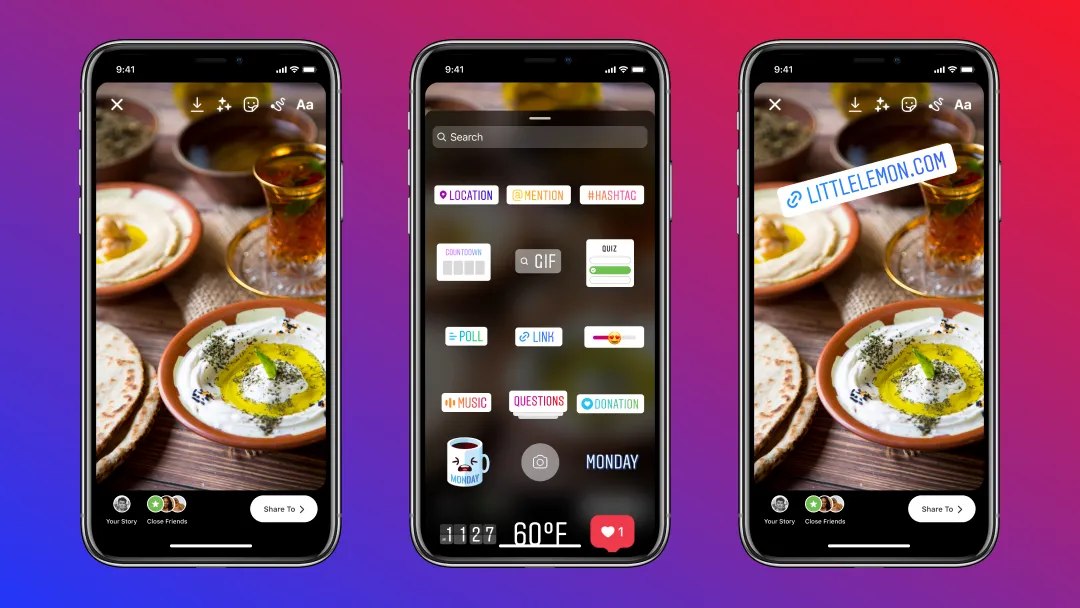
Link sharing via Link Sticker
  1. Make sure you are running the latest version of the Instagram app for IOS or Android.
  2. Swipe right from the main Instagram feed to create/upload your Instagram story.
  3. Tap the sticker tool from the navigation bar.
  4. Tap the Link Sticker.
  5. Add the website you would like to link to, and tap Done.
  6. Move the sticker to the appropriate area on your story.
  7. Tap either ‘Your Story’ or ‘Close Friends’ to publish your New Story.

Now like other Instagram stickers, if you want, you can tap on the link sticker too while in the edit phase to choose from the various color accents.

In other news, Link Sharing Stickers is not the only exclusive to Influencers feature that the social media platform has opened up for all its users. The company has also opened up access to Collabs, allowing multiple users to share the same post, likes, and comment threads.

ALSO READ: Delhi Metro Free Wi-Fi: How to Use On Yellow Line Stations

What’s Next For Instagram?

Instagram is working on a few other new features too, which are aimed at helping creators. These include Practice mode for Live, and rolling out Live scheduling too. This feature lets Live Creators schedule their Live Streams up to 90 days in advance and creators will be able to share it via their Stories and Feed posts.

Source: 1

Shivangi AgarwalShivangi Agarwal
Shivangi is a tech writer at Smartprix, where she covers consumer technology news with a focus on smartphones, wearables, laptops, and the evolving world of OTT streaming. Since joining the team in August 2021, she has written over 120 in-depth reviews, comparisons, and buying guides aimed at helping readers navigate the ever-changing tech landscape.

With a strong foundation in English literature and education, Shivangi brings clarity, insight, and a reader-first approach to every story. Her expertise lies in breaking down complex features into accessible, practical insights—whether she’s reviewing the latest smartphone or exploring trends in infotainment.

Shivangi holds a B.A. (Hons.) and M.A. in English, along with a B.Ed in English and Social Studies. She is based in Faridabad, India. You can follow her work on Smartprix or connect with her for tech-related queries.

Related Articles

ImageBMW M340i Review: The 3 Series Brian O’Connor Would Drive Today

BMW M340i review | Smartprix rating: 9.2/10. Quick Verdict: In our BMW M340i review, the BMW M340i xDrive turned out to be a six-cylinder sports sedan that still works as a daily car. Its 3.0-litre B58 petrol makes 374 bhp and 500 Nm, and it reached 100 kmph in about 4.1 seconds in our test. …

ImageInstagram now lets you pin posts to your profile; Reels can be 90 seconds long

Popular Photo sharing App, Instagram has introduced a host of new features to make the experience even better. Instagram now allows users to pin a post or a reel to their profile. It has extended the duration of Reels to 90 seconds, introduced fresh sound effects, and ability to import audio and interactive stickers among …

ImageHow to send an anonymous message on Instagram

Instagram reached 2.4 billion active users in Q4 2023 and is estimated to reach 3 billion active users by the end of 2024. Now that billions of people flock to Instagram every day, there are many fun features that Instagram and third-party app makers have come up with to spice up the Instagram user experience. …

ImageInstagram Adds Four New Features for Stories and Apple Music

Instagram has rolled out four new features aimed at improving Stories and music sharing. The changes include direct Apple Music integration, the ability to edit Stories after publishing, a redesigned location sticker, and a simpler way to customize backgrounds when sharing photos that do not fit the vertical Story format. Instagram Lets Users Save Songs …

ImageWhatsApp Guest Calling Lets Anyone Join a Call From a Browser

Until now, joining a WhatsApp call required an account. The instant messaging platform is changing that rule. Guests can join by opening a shared link in a computer browser. All they’ve to do is type a name and wait for the host’s approval (without installing the app or creating an account). Also Read: Base Galaxy …

Discuss

Be the first to leave a comment.