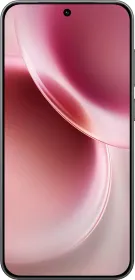
The vivo X300 brings one of the most substantial imaging upgrades ever seen on a compact flagship. The main camera and the telephoto sensors are new, and the selfie camera gets a major overhaul, with the software pipeline getting better. In many ways, this is the biggest jump in camera capability from one model to the next in vivo’s lineup. With that in mind, let’s dive into the full camera review and see how the vivo X300 performs in real world use.
vivo X300 Camera Specs

Before diving into individual lenses, here are the raw specs:
- Main: 200 MP Samsung HPB, 1/1.4 inch, 23 mm, f/1.68, OIS, AF, 12 cm MFD, 4K 120/60/30
- Ultra Wide: 50 MP Samsung JN1, 1/2.76 inch, 15 mm, f/2.0, AF, 3.5 cm MFD, 4K 60/30
- Telephoto: 50 MP Sony LYT602, 1/1.95 inch, 70 mm, f/2.57, OIS, AF, 15 cm MFD, 4K 60/30
- Selfie: 50 MP Samsung JN1, 1/2.76 inch, 20 mm, f/2.0, AF, 4K 60/30
Digital zoom goes up to 100X, but the phone supports the ZEISS 2.35X Extender Kit, enabling 170 mm optical reach and even longer digital zoom, though we were not able to test the extender.
Main Camera

The 200 MP HPB sensor is a major upgrade over the X200’s 1/1.56-inch primary camera. The larger 1/1.4-inch sensor captures more light, and the 23 mm equivalent focal length gives images a wider, more natural perspective.
In daylight, colours look controlled in ZEISS Natural and textured profiles, and highlight behaviour is more predictable. Contrast has improved, and the sensor handles shadow detail with better balance.


HDR works well in general, but neon signs and bright light sources in low light tend to glow unnaturally, creating a halo-like effect that wasn’t as noticeable on the X300 Pro. Snapshot mode is super helpful for capturing fast-moving subjects.


The 200 MP and 50 MP modes produce excellent detail but take significantly longer to process. The delay is noticeable compared to the Find X9, which shoots 50 MP by default without lag. The viewfinder also doesn’t entirely match the final image for exposure/detail; the captured shot often appears brighter or darker than the live preview.


RAW Lighting Mode
RAW Lighting is available only in the Photo mode, and when enabled, it reduces sharpening, HDR, and AI processing, producing a flatter, more natural output.


However, the dynamic range takes a hit, and low light images look better with the default pipeline. RAW Lighting works best for flat scenes at native focal lengths (0.6X, 1X, 2X, 3X, 6X) only. 10X shots using RAW Lighting don’t look good.
Ultra Wide Camera
The 50 MP JN1 ultra-wide offers autofocus and a 3.5 cm minimum focusing distance, which helps with close-up shots. Daylight performance is solid, with colours aligning well with the main camera. Sharpness is good in the centre, though the edges soften slightly. Low light performance is also fine, nothing extraordinary.


Telephoto Camera
The 50 MP LYT602 telephoto sensor is one of the strongest aspects of the X300 camera system. At 3X optical (70 mm), images look nice with excellent depth and separation thanks to the large 1/1.95-inch sensor. Colour reproduction is alright, and the 15 cm close-focus ability allows surprisingly detailed telemacro shots.


Portraits
Portraits at 3X look great, though skin tones still need refinement. Even with beauty features disabled, the phone applies mild softening that reduces facial details and sometimes even adds a white cast on the skin. Edge detection can miss stray hair strands, especially in backlit and indoor scenes.


The portrait mode also includes the complete set of ZEISS bokeh options, which make the portraits look incredible.
- Biotar
- Sonnar
- Planar
- Distagon
- B-Speed
- Cinematic
- Cineflare


Zoom, AI, and Low Light
AI processing on the X300 remains too aggressive even at the lowest “Off” setting. You can choose between Off, Normal, and Extreme, but even Off applies extra clarity and AI enhancement. At times, the camera even tries to enhance out-of-focus areas using AI reconstruction, which leads to an artificial look.


There’s also an issue with the viewfinder not matching the final output at all. This needs to be addressed.


Zoom performance holds well up to about 10X, and 20X remains usable for social media, though with a lot of AI. Beyond that, the AI becomes more visible, but 100X is available for extreme digital zoom situations. The stabilization seems to be better than the previous X200 model.


Although the X300 lacks an automatic bird detection like the Pro model, it is also perfectly capable of capturing birds at up to 10X magnification. The results are quite good, especially when you consider the fact that they are coming from such a compact device.


Low light performance of the telephoto mimics the 1X processing, as the noise reduction is really good and the detail retention is acceptable for night time shots. The phone may switch to night mode during certain indoor conditions too.


Night mode itself on the X300 is tuned well and now sits inside Landscape and Night mode. You can push exposure to 2 minutes 37 seconds on a tripod and up to 10 seconds handheld. vivo also makes star trails and other long exposure shots much simpler through this mode.
Humanistic Mode
I think the solution (at least for now) to the AI processing isn’t RAW Lighting, but it’s the Humanistic Mode. Humanistic mode gives the most natural-looking and life-like photos on the X300. You access it by swiping from the bottom of the camera viewfinder, which opens a dedicated humanistic panel. It supports the following ZEISS-like fixed portrait focal lengths: 24 mm, 35 mm, 50 mm, 85 mm, 135 mm.


It automatically chooses the aperture for background blur, but you can override it by entering the Pro controls within this mode. Colour profiles also change the rendering style to match different looks. My personal favourite is the Textured profile, which breathes some soul into the photos.
However, the limitations are important to note:
- No HDR
- No night mode
- No text processing
- No optical 70 mm
- No selfie or ultrawide support
- No zoom beyond 6X
- Only five fixed focal lengths
Essentially, you pick the mode based on the scene. The default mode works well for most people who do not mind AI. Anyone who prefers less processing will need to switch between Humanistic, RAW Lighting, and Default to figure out what delivers the best result for that moment.
Selfie Camera
The 50 MP AF selfie camera is one of the best upgrades on the X300. Compared to the X200’s fixed-focus 32 MP unit, the difference is dramatic. Selfies are sharp, clean, and consistent across lighting conditions. Low light performance is solid with good skin tones. The autofocus system keeps multiple faces sharp in group shots. At 20mm, it’s also the widest selfie camera on any Android device.


Video
The X300 records:
- Main: 4K 120/60/30 (LOG)
- UW: 4K 60/30 (LOG)
- Tele: 4K 60/30 (LOG)
- Selfie: 4K 60/30
There is no Dolby Vision support.

Video quality from the main sensor is good, with impressive detail and controlled colours. However, I still found the Find X9 and the iPhone 17 doing better, especially in low light. Stabilisation is good but you can get additional stabilization at up to 2.8K 60 FPS on the main and 3X cameras.
The main and ultra-wide can struggle with neon and bright signboards. 4K120 video is supported on the main camera and you can’t switch lenses when recording in LOG format.
There are different video recording modes available, including Dual View recording, which lets you record using any two lenses at the same time in 4K30. You can also choose to save both files separately or merge them in PIP or top/bottom view. The vivo X300 is perhaps the best phone for dual view recording in the segment.
Pro Video mode includes full manual controls, histograms, focus peaking, and LOG support too. You also have live LUT preview and the ability to apply the LUT directly from the gallery app after recording.
vivo X300 Keeps a Compact Design with a Capable Camera System
Overall, the vivo X300 easily outperforms the X200 and even beats the iPhone 17 in most of my comparisons. The larger sensors, improved colour science, and better stabilization give it an edge. However, vivo needs to refine AI processing, HDR behaviour in neon-heavy scenes, portrait skin tones, and high-resolution capture speeds.
If you want natural looking portraits with lighter AI involvement, the Find X9 will still suit your style better. If you want telemacro and more options to play with, and a more versatile lens setup in a compact body, the X300 becomes the better pick. For users who prioritise video above everything, another flagship class device might still be a better match.
You can read our complete vivo X300 review here for the full breakdown of design, display, performance, software, battery tests, and overall verdict: vivo X300 Review: Is this THE Compact Flagship You’ve Been Waiting For?

You can follow Smartprix on Twitter, Facebook, Instagram, and Google News. Visit smartprix.com for the latest tech and auto news, reviews, and guides.