What Are Instagram Profile Cards And How To Use Them For Sharing Your Profile?

Main Image
  • Like
  • Comment
  • Share

Until now, sharing an Instagram profile involved sending the profile’s link or the username in DMs, stories, or other mediums. However, the Meta-owned social platform has launched a new feature that makes it easier for people to share their Instagram profile with others in a fun yet effective manner. The feature is called “Profile Card.” Here is what it does and how to create your own Profile Card to share with Instagrammers.

ALSO SEE: 6.6 inch Mobile Phones Price List in India 2024

What Are Instagram Profile Cards?

Instagram Profile Cards (1)

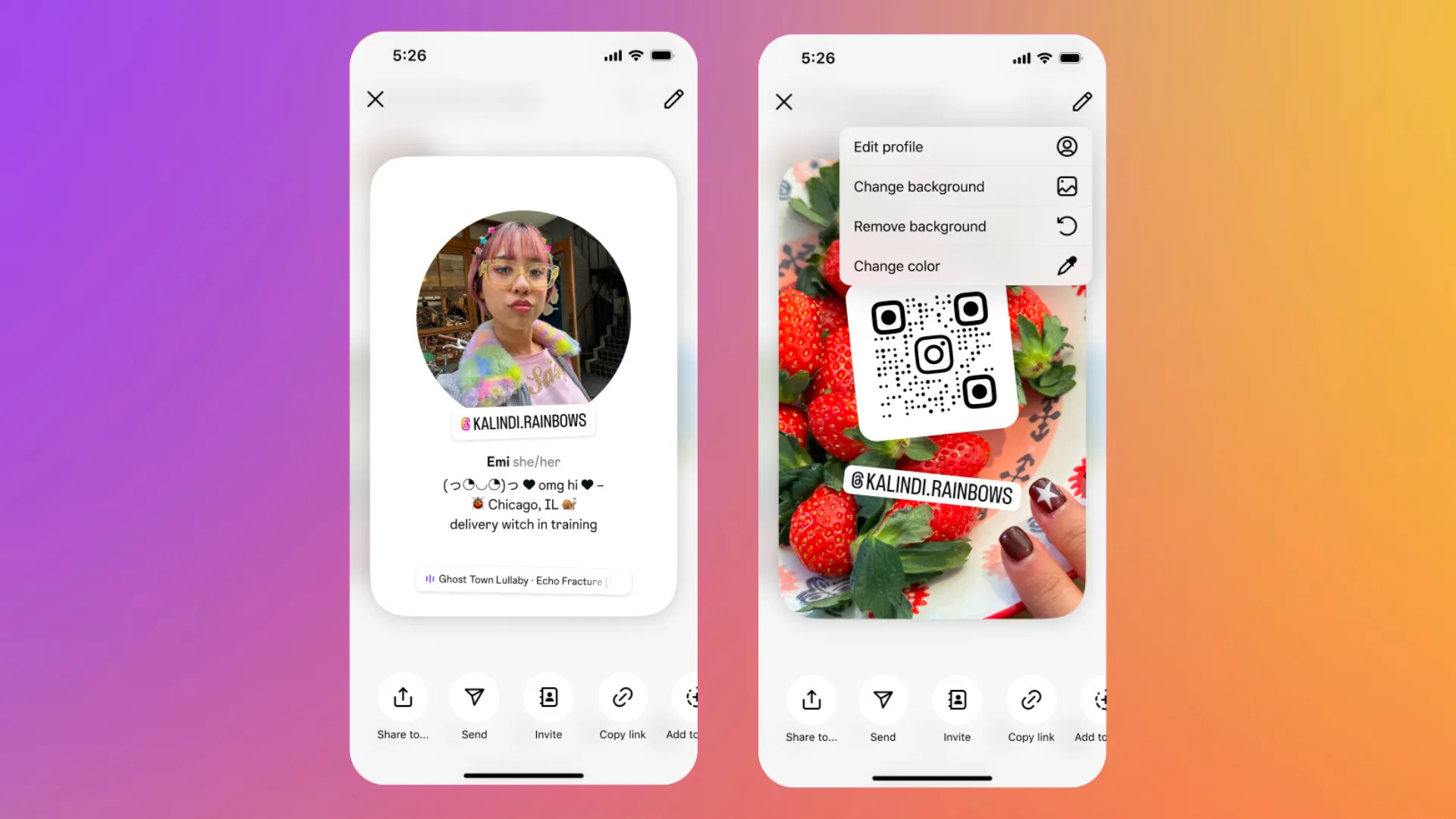
Like a business card, the Profile Card is an animated digital card containing basic information about your Instagram profile. The two-sided card lists your profile picture, username, display name, and bio (with any links in your bio) on one side and a scannable QR code (which opens your Instagram profile) on the other side.

So, instead of manually sharing your profile, you can download the Profile Card and share it with the required person. Moreover, the Instagram Profile Card feature streamlines the process of sharing profiles on the platform. With the rise in the number of creators and professional users, the ability to share profiles easily is a welcome addition.

ALSO SEE: Intel Core i7 Laptops Under 50000

How To Create Your Instagram Profile Card?

Steps to create profile cards on Instagram
  • Open Instagram on your smartphone.
  • Head to the profile section.
  • Tap on the “Share Profile” button.
  • This should show the Profile Card for your Instagram account. You can swipe to see both sides of it and tap on the edit icon at the top right to change the details in your bio or modify the background of the Profile Card.
  • Then, you can either download the card as a video, take its screenshot to share it with someone, or copy its link and send it via other apps.
  • You can also open an Instagram account and tap on the share button to create a Profile Card.

We found that copying the link of the card and sharing is the most effective way, as it opens the card on the other person’s Instagram with clickable links (from the bio) and the option to follow, message, or view the profile shared.

ALSO SEE: Automatic Cars Under ₹15 Lakh

You can follow Smartprix on TwitterFacebookInstagram, and Google News. Visit smartprix.com for the latest tech and auto newsreviews, and guides.
Shikhar MehrotraShikhar Mehrotra
Shikhar Mehrotra is a seasoned technology writer and reviewer with over five years of experience covering consumer tech across India and global markets. At Smartprix, he has authored more than 1,700 articles, including news stories, features, comparisons, and product reviews spanning automobiles, smartphones, chipsets, wearables, laptops, home appliances, and operating systems. Shikhar has reviewed flagship devices such as the iPhone 16, Galaxy S25+, and Sennheiser HD 505 Open-Ear headphones. He also contributes regularly to Smartprix’s growing automotive section.

With a deep understanding of both iOS and Android ecosystems, Shikhar specializes in daily tech news, how-to explainers, product comparisons, and in-depth reviews. His DSLR photography in product reviews is recognized as among the best on the team.

Before joining Smartprix, Shikhar wrote for leading publications including Forbes Advisor India, Republic World, and ScreenRant. He holds a Bachelor of Arts in Journalism and Mass Communication from Amity University, Lucknow.

Related Articles

ImageExclusive: Redmi Turbo 5 Coming to India on June 18 with One More Phone

Redmi is preparing for a major market push in India, targeting two entirely opposite ends of the consumer spectrum. According to an exclusive leak from trusted industry insider Yogesh Brar, the brand will simultaneously drop a premium performance beast and an ultra-affordable 5G daily driver soon. Launch Details Mark your calendars for June 18. Our …

ImageHow to Add Profiles of Family Members on Your mAadhaar Application

The Aadhaar Number is a unique 12-digit identification number that is different for every individual living in India. It is proof of one’s identity and address as a resident of the country. To make modifications to Aadhaar data easier, UIDAI announced the mAadhaar app that is free to use and can be used for a …

ImageHow To Get Verified on Instagram and Facebook in India?

Meta has finally announced the Meta Verified services in India along with the UK, and Canada. At just INR 699/mo, users can get their Instagram and Facebook accounts verified on their Android and iOS devices. The web option is not available in India yet although the parent company Meta is planning on launching the same …

ImageInstagram Launches Instants Globally: A Disappearing Photo Feature That Lets You Share Candid Moments With Close Friends

Instagram built its early reputation on candid moments shared between friends and family members. However, over the years, that reputation got buried under influencer content, brand campaigns, and constant pressure to post things that look good.  Well, Instants is Meta’s attempt to claw some of that original spirit back into the platform, and it went …

ImageSamsung Brings AirDrop Support to Quick Share on Galaxy S26 Series

With the Pixel 10 series, Quick Share started supporting AirDrop-style file transfers. That later expanded to the Pixel 9 series as well. The idea was simplRe, you could share files directly with iPhones using native AirDrop, without installing anything extra. All you had to do was enable the “Everyone” option in AirDrop on the iPhone, …

Discuss

Be the first to leave a comment.

Related Products