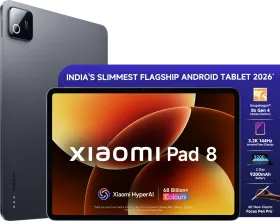
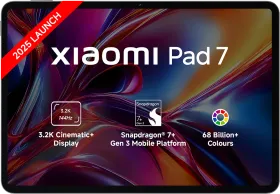
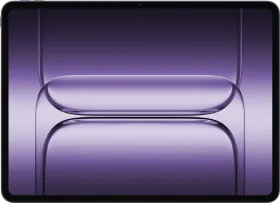
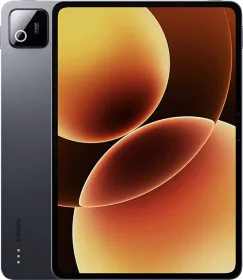
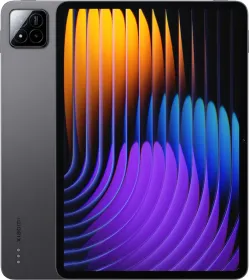
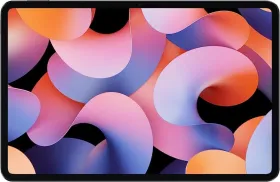
The Xiaomi Pad 8 arrives at a time when electronics are getting more expensive. RAM prices are rising, chipsets are becoming costlier, and many new phones and tablets are slowly pushing their prices upward. In that situation, the Pad 8 stands out because it still manages to deliver strong hardware without pushing the price too far.
The tablet comes with a Snapdragon 8s Gen 4 processor, a sharp 3.2K display with a 144 Hz refresh rate, quad speakers, and decent battery, all in a slim body. That combination immediately makes it appealing for people who mainly want a large screen for watching content, browsing, reading, and light productivity.
Yes, the display is an LCD panel, but Xiaomi has tuned it well. In most situations, you will not notice it is not an OLED screen. For movies, YouTube, or general browsing, the experience ends up being surprisingly good.
The hardware is strong, the display is enjoyable, and the pricing makes it even more interesting in this segment. Let’s take a closer look at the Xiaomi Pad 8 in this detailed review.
Xiaomi Pad 8 Price & Availability
Xiaomi offers the Pad 8 in several configurations.
Standard Models:
- 8 GB + 128 GB: ₹33,999
- 12 GB + 256 GB: ₹36,999
- 12 GB + 256 GB (Nano Texture): ₹38,999
Xiaomi is also offering up to ₹3,000 card discount, which slightly reduces the effective price depending on the offer available at purchase.
Creator’s Edition (Tablet + Focus Pen Pro):
- 12 GB + 256 GB: ₹41,999
- 12 GB + 256 GB (Nano Texture): ₹43,999
Accessories Pricing:
- Pad 8 Cover: ₹1,499
- Keyboard: ₹4,999
- Focus Pen Pro: ₹5,999
- Focus Keyboard: ₹8,999
The Xiaomi Pad 8 will be available on Amazon, mi.com, and offline stores starting March 17, 2026.
Pros
- Very good value for the hardware
- Powerful Snapdragon 8s Gen 4 processor
- Sharp 3.2K 144 Hz display
- Good quad speaker setup
- Slim and lightweight design
- HyperOS 3 has good customization options
- Strong ecosystem connectivity
- Decent battery life
Cons
- No fingerprint scanner
- Face unlock is unreliable
- Focus Pen occasionally stops responding
- Keyboard touchpad is very small
- Charging speed could’ve been faster
Xiaomi Pad 8 Specifications
- Display: 11.2-inch LCD, 3200 x 2136 resolution (3.2K), 345 PPI, up to 144 Hz refresh rate, 360 Hz touch sampling rate, 240 Hz stylus sampling rate, 800 nits peak brightness
- Processor: Snapdragon 8s Gen 4 (1x Cortex-X4 @3.2 GHz + 3x Cortex-A720 @3.0 GHz + 2x Cortex-A720 @2.8 GHz + 2x Cortex-A720 @2.0 GHz), Adreno 825 GPU
- RAM: 8GB LPDDR5X/ 12GB LPDDR5T
- Storage: 128GB UFS 3.1/ 256GB UFS 4.1
- Rear Camera: 13MP f/2.2 4K30
- Front Camera: 8MP f/2.2 1080p30
- Battery: 9200 mAh, 45W wired charging
- Connectivity: Wi-Fi 7, Wi-Fi 6E, Wi-Fi 6, Bluetooth with LDAC and LHDC 5.0, USB-C (USB 3.2 Gen 1, up to 5 Gbps)
- Audio: Quad speakers, Dolby Atmos
- Biometrics: Face unlock
- Dimensions: 251.22 mm x 173.42 mm x 5.75 mm
- Weight: 485 grams
- OS: Xiaomi HyperOS 3; 4 OS + 6 years of security updates
Xiaomi Pad 8 Review: Unboxing

The Xiaomi Pad 8 comes in a fairly minimal retail package. Inside the box you get the tablet itself, a USB-C cable, 67W charger (45W supported), and the usual paperwork. That is essentially everything included with the device.
Accessories such as the Focus Pen Pro, Focus Keyboard, and protective cover are also sold separately unless you purchase the Creator’s Edition bundle.
Xiaomi Pad 8 Review: Design and Build
The Xiaomi Pad 8 uses a very slim aluminum design that focuses on portability. Xiaomi clearly aimed to make the device thin and lightweight without sacrificing battery capacity.
The tablet measures just 5.75 mm in thickness and weighs around 485 grams, which makes it one of the slimmer tablets in this category. Despite the thin body, Xiaomi still manages to fit a 9200 mAh battery inside, which is impressive for the size.

The device feels solid in hand thanks to its metal construction. Flex is minimal and the overall build quality feels reassuring. It is easy to carry around and comfortable to hold during reading or streaming sessions.


Bezels around the display are reasonably thin and symmetrical. They are narrow enough to look modern but still provide enough space to hold the tablet without accidental touches.

Xiaomi offers the Pad 8 in Graphite Grey and Titanium Blue. I have the latter with me for this review, and it does look really good in person.
One noticeable omission is biometrics. The tablet does not include a fingerprint scanner, and unlocking relies entirely on 2D face unlock, which has been quite unreliable in my experience.

Xiaomi Pad 8 Review: Display

Let’s start with the display, because this is easily one of the highlights of the Xiaomi Pad 8. You get an 11.2-inch LCD panel with a 3.2K resolution (3200 x 2136) and a pixel density of 345 PPI. Everything looks crisp, whether you are reading documents, watching videos, or just scrolling through apps. There’s also support for a 144 Hz refresh rate, which keeps things smooth.
Now before you panic about the word LCD, relax for a second. This is easily one of the best LCD panels you will find on a tablet right now. Xiaomi has tuned it extremely well. Colors look balanced, brightness is strong, and contrast looks surprisingly good. In regular day to day use, most people will barely even think about the fact that it is not an OLED panel.

The display also supports Dolby Vision, HDR10, and the DCI P3 wide color gamut. When you watch compatible content on streaming platforms, you will notice nicer colors and better overall picture quality.
Brightness can go up to around 800 nits, which makes the screen comfortable indoors and still usable outside when you step into brighter environments. Xiaomi also includes HydroTouch technology. The screen stays responsive even if your fingers are slightly wet, but it doesn’t work very well.

Xiaomi also paid attention to eye comfort. The display carries TÜV Rheinland Low Blue Light, Flicker Free, and Circadian Friendly certifications. Reading for long hours, note taking, or study sessions feel easier on the eyes.
Xiaomi also includes a Nano Texture display option. This version adds an anti glare and anti reflective coating that should cut down reflections and make writing with a stylus feel closer to paper.

Put all of this together, and the display easily becomes one of the strongest parts of the Xiaomi Pad 8. It works great for watching content, reading, writing notes, and general everyday tablet use.
Xiaomi Pad 8 Review: Speakers

The Xiaomi Pad 8 uses a quad speaker setup with Dolby Atmos support. Xiaomi says it redesigned the acoustic structure to improve clarity and low-frequency response.
In everyday use, the speakers sound good. Dialogue stays clear and stereo separation is noticeable when you hold the tablet horizontally, which helps when watching videos or movies.
Volume is decent, though it does not get very loud. Bass is present but not very deep, which is expected on tablets. Even then, the speakers still sound clean and easily sit among the better tablet speakers in this segment.
Xiaomi Pad 8 Review: Focus Pen Pro and Focus Keyboard
Xiaomi offers two main accessories for the Pad 8: the Focus Pen Pro and the Focus Keyboard. Let’s start with the Focus Pen Pro.
Focus Pen Pro uses a buttonless design with gesture controls. You can switch tools, adjust brush thickness, or open settings directly through pen gestures. It also supports hover preview, pen rotation, and haptic feedback, which helps make writing and drawing feel more precise.

The stylus supports over 16,000 pressure levels, so strokes look detailed when sketching or taking notes. Latency is low and the pen works well for annotations, drawing, and note taking.

In daily use the pen feels smooth most of the time. There were a few moments where the stylus briefly stopped responding before working again. It does not happen often, though I hope Xiaomi resolves that issue soon.
The Focus Keyboard turns the tablet into a small workstation setup. It attaches magnetically and supports adjustable viewing angles up to around 124 degrees. The keys are backlit and typing feels comfortable though I wish the viewing angles were adjustable to a higher degree.

The touchpad is the main limitation. It feels quite small. It works for basic gestures and navigation, though it feels cramped compared to other trackpads.

Even with that limitation, the keyboard still makes the Pad 8 much more useful for writing, browsing, and light productivity work.
Xiaomi Pad 8 Review: Software

The Xiaomi Pad 8 runs Xiaomi HyperOS 3, which provides a nice smooth and fluid experience. The interface includes redesigned icons, improved animations, and a layout optimized for larger screens.


One of the key features is Workstation Mode, which allows the tablet to behave more like a desktop environment. Apps can run in multiple windows, and the layout resembles a PC interface. Combined with a keyboard accessory, the experience becomes closer to a lightweight laptop.

HyperOS also includes improved split-screen multitasking with smarter layouts in both horizontal and vertical orientations. A dock-style multitasking bar lets multiple apps run side by side, which helps when working with documents, browsing the web, or referencing information while writing.

The tablet also includes Xiaomi HyperAI features, such as AI Calculator, AI Voice Recording, Xiaomi Creation tools, and Gemini AI integration. There is support for Circle to Search as well.
Another important part of the software experience is HyperConnect, Xiaomi’s cross-device ecosystem platform. It includes features like Call Sync, Tap-to-Share using NFC, screen extension, dual-screen browsing, and faster file transfer between devices.

Overall HyperOS 3 works well on the tablet. It feels fluid most of the time and includes several productivity-focused features designed specifically for large screens.
Xiaomi Pad 8 Review: Performance

The Xiaomi Pad 8 is powered by the Snapdragon 8s Gen 4 mobile platform, built on a 4 nm process. The CPU uses an all big-core architecture, consisting of 1x Cortex-X4 at 3.2 GHz, 3x Cortex-A720 at 3.0 GHz, 2x Cortex-A720 at 2.8 GHz, and 2x Cortex-A720 at 2.0 GHz, paired with the Adreno 825 GPU.
8s Gen 4 chipset is positioned close to flagship performance and is significantly stronger than the processors used in most tablets in this price range.
Synthetic Benchmarks
| Benchmark | Xiaomi Pad 8 (Snapdragon 8s Gen 4) |
| AnTuTu v11 | 2238168 |
| Geekbench 6 CPU | 2008 (Single) / 6134 (Multi) |
| Geekbench 6 GPU (OpenCL) | 13782 |
| Geekbench 6 GPU (Vulkan) | 18971 |
| Wild Life Extreme Stress Test | Best: 3961, Lowest: 3524, 89% |
| Wild Life Extreme Overall Score | 3991 / Avg FPS: 23.9 |
| Storage Test Score | 185391 (Read: 3998 MB/s, Write: 3574 MB/s) |


In day-to-day usage, the tablet feels fast and responsive. Opening apps, switching between tasks, and scrolling through the interface feel smooth. Multitasking also works well thanks to the fast processor and LPDDR5X or LPDDR5T RAM depending on the configuration.
Storage speed varies by model. The 128 GB variant uses UFS 3.1, while the 256 GB model upgrades to faster UFS 4.1 storage, which improves loading speeds and file transfers.
The tablet crosses 2.2 million points in AnTuTu v11, which should give you a rough idea of the performance level. Heavy apps, productivity tools, and most games run without major issues. It is, in fact, a great tablet for gaming and I don’t think any other Android tablet in this segment comes close.
Thermal performance is also reasonable. The tablet warms up during heavy gaming or extended workloads like video editing but does not become uncomfortable to hold.
Overall the Xiaomi Pad 8 delivers strong performance for a tablet in this price range and handles multitasking, gaming, and productivity tasks without major trouble.
Xiaomi Pad 8 Review: Cameras

The Xiaomi Pad 8 includes a 13 MP rear camera with PDAF and an f/2.2 aperture, along with an 8 MP front camera.
The rear camera supports 4K video recording at 30 fps, along with 1080p and 720p recording options. The camera app includes modes such as Photo, Video, Portrait, Document scanning, Teleprompter, HDR, and Professional video recording.
Image quality is acceptable for a tablet. The rear camera is mainly useful for scanning documents, capturing whiteboard notes, or quickly taking reference photos. Colors look decent but detail and dynamic range are limited.
The 8 MP front camera supports 1080p video at 30 fps and works well enough for video calls and online meetings. I would not call it a great camera for video calls though. Like most tablets, the cameras here are just to get the job done.
Xiaomi Pad 8 Review: Battery Life and Charging

The Xiaomi Pad 8 packs a 9200 mAh battery, which sounds impressive given how thin the tablet is. The actual battery life is good for typical tablet usage. Streaming video, browsing, reading, and note-taking can easily stretch across a full day.
Once you move into heavier tasks, things change a bit. Gaming, editing videos, or pushing the tablet harder will drain the battery much faster. In those situations, you will likely end up topping it up sometime during the day.
The Pad 8 supports 45W wired charging. Interestingly, Xiaomi includes a 67W charger in the box. The tablet still charges at 45W, so the extra headroom on the charger does not really change the charging speed.

A full charge takes around 1 hour and 40 minutes. That time feels fine for a tablet. It does the job, though it does not feel particularly fast.
And here is the part I really like. The Pad 8 can turn into a powerbank when you need it. You can plug in your phone or other accessories and charge them directly from the tablet at up to 22.5W. So if your phone runs low and the tablet still has battery left, the Pad 8 can easily bail you out.
Xiaomi Pad 8 Review: Connectivity Features

The Xiaomi Pad 8 supports modern connectivity standards including Wi-Fi 7, Wi-Fi 6E, Wi-Fi 6, and Bluetooth with AAC, LDAC, and LHDC 5.0 audio codecs. The device also includes USB-C with USB 3.2 Gen 1 speeds up to 5 Gbps, allowing faster file transfers and accessory support.
The tablet includes several sensors such as accelerometer, gyroscope, ambient light sensors, flicker sensor, hall sensor, magnetic sensor, proximity sensor, and even an IR remote control to control your home appliances (quite handy for a tablet if you ask me).
Xiaomi’s ecosystem integration plays a big role here. Through HyperConnect, the tablet can sync calls with a smartphone, transfer files quickly through NFC tap-to-share, extend screens across devices, and enable cross-device browsing.

The tablet can also work as a wireless secondary display for Mac and Windows PCs, allowing you to extend or mirror their computer screen. Xiaomi also supports cross-device file transfer with iPhone, iPad, and Mac, which helps when working across different ecosystems.
These connectivity features make the Xiaomi Pad 8 more versatile, so it works well for productivity while still being a great media consumption device.
Review Verdict: Should You Buy the Xiaomi Pad 8?
The Xiaomi Pad 8 ends up being a very compelling tablet for the price. It combines strong performance, a sharp high refresh rate display, good speakers, and a slim design while keeping the cost relatively competitive.
The Snapdragon 8s Gen 4 processor gives the tablet plenty of power for multitasking, gaming, and productivity tasks. The display is also a major highlight. Even though it uses LCD technology, Xiaomi’s tuning makes it look vibrant and comfortable for watching videos or reading.
However, there are a few compromises. The tablet lacks a fingerprint scanner, and face unlock is not very reliable. The Focus Pen occasionally stops responding, and the keyboard’s touchpad feels too small for comfortable navigation.
Nonetheless, despite those drawbacks, the overall package remains impressive for the price. For anyone looking for a powerful Android tablet under ₹40,000 with great performance, a high-quality display, and good media and productivity capabilities, the Xiaomi Pad 8 offers excellent value.

Smartprix ⭐ Rating: 8.3/10
- Design and Build: 9/10
- Display: 8.7/10
- Speakers: 8.5/10
- Software: 7.6/10
- Performance: 8.5/10
- Cameras: 7/10
- Battery Life & Charging: 8/10
- Connectivity Features: 8.5/10
First reviewed in March 2026.