How To Add A Second Person To Your iPhone’s Face ID

Main Image
  • Like
  • Comment
  • Share

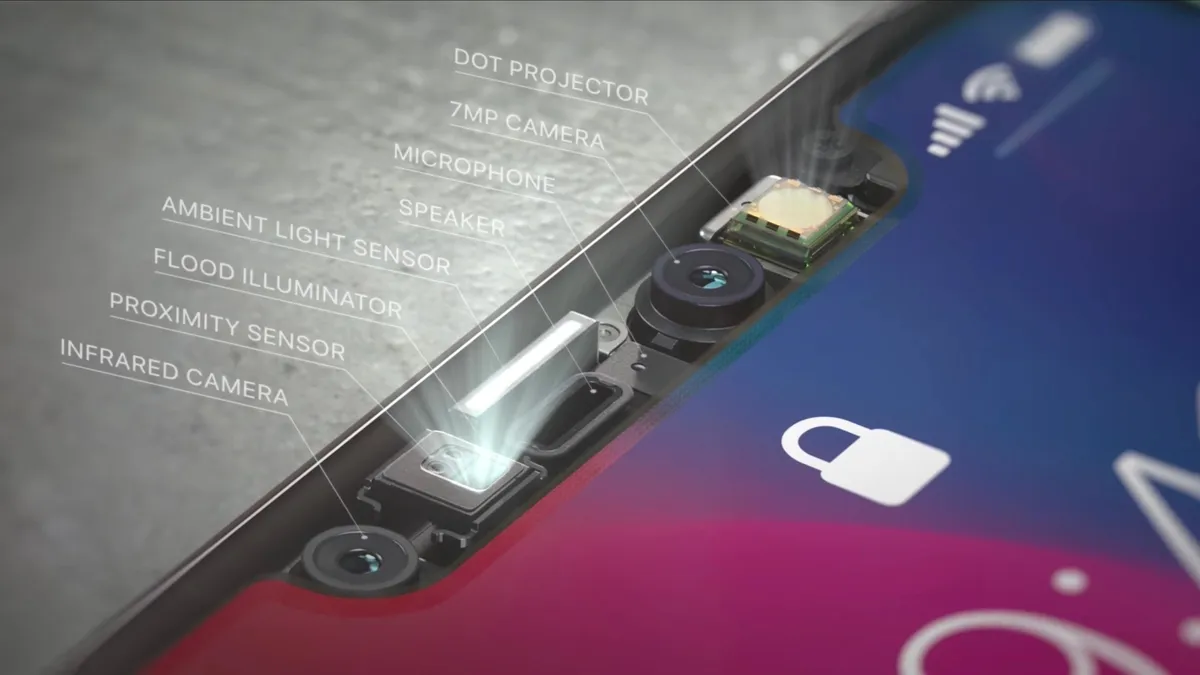
Face ID is the 3D face recognition technology which projects 30,000 infrared spotlights to the face and collects its depth information resulting in the identification of your face. Initially, people had their inhibitions towards this new technology. However, with time they adapted to this advanced evolution from Touch ID. In the iOS 12 update, Apple included the option to add an alternate face in the Face ID setup. This should help if you wish to give access to another trusted acquaintance or family member, who have to otherwise unlock using your pattern.

Here’s how you can add a second face to your iPhone’s Face ID

Also Check: iPhone XS and iPhone XS Max Review

Prerequisites

First of all clean the notch area where the Truedepth camera setup is located. Also, try to set up in a well-lit area for better detection. Needless to say, try avoiding any cap, shades or accessories which you don’t normally wear.

How to better use FaceID on your iPhone: Tips and Tricks

How to register a second face to iPhone’s Face Unlock

Now that you’re ready, follow the steps below to set up a secondary face.

  1. Go to the Settings app in iOS 12.
  2. Scroll down and click on Face ID & Passcode.
  3. Enter your passcode to verify that it’s you.
  4. Now, tap the “Set Up an Alternate Appearance.”

    Set up an alternate appearance (settings menu)
    Set up an alternate appearance (settings menu)
  5. Henceforth, the standard Face ID setup procedure will begin, so add your face or some other person with whom you want to share the phone with.
  6. Next Tap Set Up Face ID and position the face in front of the device and tap Get Started.
  7. Look straight and still into the notch area (within the frame area) and keep an optimal distance of around 25–50 centimeters, or 10–20 inches as advised by Apple.
  8. Next, move the head to complete the green circle.
  9. Click Continue once the scan is complete.
  10. Now repeat the Step 8 for the second time.
  11. Once Face ID setup is complete, tap Done.

    Face ID scan screen interface
    Face ID scan screen interface

Give someone else access to Face ID

This is how you can grand trusted individuals access to your iPhone’s Face ID. Needless to say, you need to be careful as Face ID can also be used to access confidential payment apps and more on your phone.


Vasan G.S.Vasan G.S.
An inquisitive mind who spends a big chunk of the day keenly tracking every emerging detail and is responsible for quickly passing on important developments to Smartprix followers. He loves to stay in his bubble scripting his destiny involving amazing technology and people with good character, passion, and brilliance.

Related Articles

ImageIndia’s Ethanol Push Meets a Corrosive Reality: Automakers Flag E20 Concerns

India’s aggressive push toward E20, petrol blended with 20% ethanol, has hit a silent but significant speed bump. While major car brands publicly support the green initiative, recently surfaced internal communications via Reuters, reveal that industry heavyweights like Maruti Suzuki, Tata Motors, and Mahindra have privately raised serious concerns over fuel contamination that could wreak …

ImageApple iPhone XS Max, iPhone XS FAQ: Everything You Need To Know

Apple’s next generation of iPhones are official, and certainly one of them is the biggest iPhone they have ever made. The new premium iPhones are called – the iPhone XS and iPhone XS Max. Not much has evolved aesthetically in comparison to iPhone X but Apple has made major changed under the hood. Biggest ever change …

Image5 Apple iPhone launch Event Key Highlights – Everything to know about iPhone Xs, Xs Max, XR, Apple Watch 4 and more

Apple’s biggest annual event just went live. The Cupertino giant announced three new iPhones – iPhone Xs, iPhone Xs Max, and iPhone XR – along with the new Apple Watch Series 4 and laid out a vision of what else you should expect in the year ahead. Let’s take a look at everything important Apple …

ImageOppo’s ColorOS 16 July Update Adds Fingerprint Animations, Two New Camera Filters, And A Smarter Face Unlock

Oppo India has begun rolling out the ColorOS 16 July update to eligible smartphones. It adds a fresh set of personalization tools, camera enhancements, and performance refinements that should benefit all types of users. The rollout is being pushed in phases throughout July. Also Read: Dreame D30 Ultra Robot Vacuum Cleaner Launched In India: Check Features …

ImageEngland vs Argentina Live Stream: How to Watch the 2026 Fifa World Cup Semifinal Online for Free

England and Argentina face off in the second semifinal of the 2026 FIFA World Cup at Mercedes-Benz Stadium in Atlanta. This rivalry goes back decades, including the famous 1986 match with Maradona’s “Hand of God” goal. Both teams want a spot in the final, and history adds extra weight to this meeting. England is aiming …

Discuss

Be the first to leave a comment.

Related Products