How to transfer WhatsApp backup from iPhone to Android

Main Image
  • Like
  • Comment
  • Share

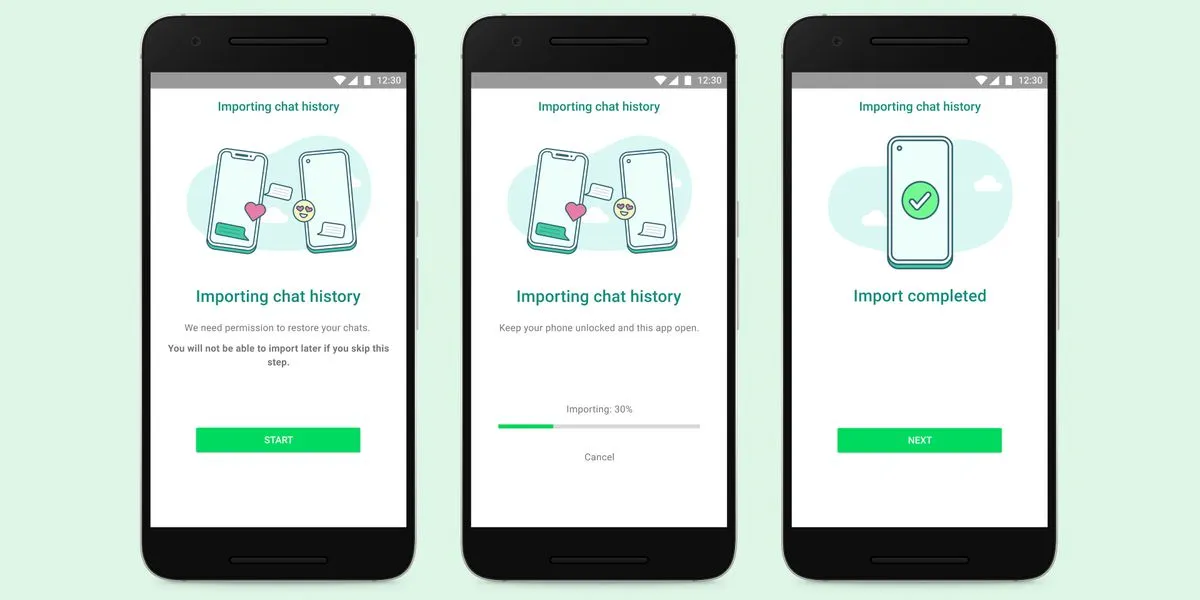
It is now possible for WhatsApp users to transfer their chats from iOS to Android, including all voice notes, photos, videos, and conversations. Samsung Galaxy Unpacked 2021 announced the much-anticipated feature last night. There’s a catch, though. Transfers from iOS to the latest Samsung Galaxy Z Fold3 and Galaxy Z Flip3 will be available initially, with other Samsung phones to follow soon. At some point, WhatsApp will enable chat transfers between iOS and Android devices. However, a timeline has not been provided.

WhatsApp chat transfer: How it works?

The new chat transfer feature, which WhatsApp will launch in the coming weeks, will use a physical Lightning to USB Type-C cable instead of transferring wirelessly. Nonetheless, if you have transferred between iOS and Android in the past and have two separate cloud backups, the new feature will not merge them into one conversation history. In either case, WhatsApp will overwrite any existing backups.

ALSO READ: How to watch JioTV on Smart TVs and Laptops for Free

ALSO READ: How to download your COVID-19 vaccination certificate on WhatsApp

Samsung’s new foldable phones will be the first to support WhatsApp transfers from iOS, then Samsung devices running Android 10 and above will have the ability to do so shortly after. While the company has not yet mentioned when the feature might be available on non-Samsung Android phones, since WhatsApp has begun talking about chat transfers between iOS and Android, we can expect it to appear sometime this year.

Image Credits: Whatsapp and Samsung

Tanisha MurdeshwarTanisha Murdeshwar
Writing has always been my passion even though I'm a marketing graduate with a diploma in innovation and entrepreneurship. This is the reason for my choice of career. When I'm not writing, I enjoy reading, traveling, and studying languages.

Related Articles

ImageWhatsApp Starts Rolling Out Redesigned Group Info Page on iOS

WhatsApp is rolling out a redesigned group info interface for iPhone users, bringing a cleaner layout that makes it easier to find members, shared media, and group settings. The feature was spotted by WABetaInfo in the latest WhatsApp beta for iOS available through TestFlight, and follows a similar redesign that recently arrived on Android. Three …

ImageHow to transfer WhatsApp data from Android to Apple iOS via the ‘Move to iOS’ App

Gone are those days when Android and iPhone users could not exchange any form of data with each other. Now, Apple has announced a Move to ios data porting app that will help in transferring data between Apple and iOS. The feature will be available in WhatsApp’s Beta version and will roll out slowly and …

ImageWhatsApp Web login: How to make Whatsapp video call from PC or Laptop, Check WhatsApp Login, WhatsApp PC shortcut keys

The introduction of WhatsApp Web login has been a blessing for windows and mac users as it allows to get access to their favourite messaging service Whatsapp on their laptop or PC. If you are working on your PC/Laptop and don’t want to reach for your phone again and again in the middle of it, …

ImageWhatsApp Brings Built-In Translation to Android and iPhone

WhatsApp is now rolling out message translation on Android and iPhone, starting today. You can long-press a message, tap “Translate,” and get instant results without leaving the chat. Language packs can be downloaded for smoother use, and since it’s all processed locally, Meta doesn’t see your texts (at least that’s what they say).Android starts …

ImageWhatsApp may soon show a green dot when your contacts are online

WhatsApp is rolling out a new feature that makes it easier to see when your contacts are actively using the app. A growing number of users are now seeing a green dot next to contacts who are currently online, following months of beta testing. The feature first appeared in WhatsApp’s Android beta builds and is …

Discuss

Be the first to leave a comment.