How to unsend an email in Gmail: Know more about ‘Undo Send’ feature of Gmail

You can easily unsend an email on Gmail, thanks to the 'Undo Send' feature.

Main Image
  • Like
  • Comment
  • Share

Your work may require you to send several emails to various kinds of connections daily. In the process, you might have faced the issue of sending the wrong email or forgetting to attach the files immediately after hitting the send button. Well, if you are a Gmail user, Google lets you rectify your mistake by unsending a mail.

However, recalling the email feature on Gmail is valid for a very short time i.e. for up to 30 seconds. Nevertheless, here is a quick way to let you learn how to unsend or retract an email on Gmail service platforms for web and mobile applications. 

How to unsend an email in Gmail

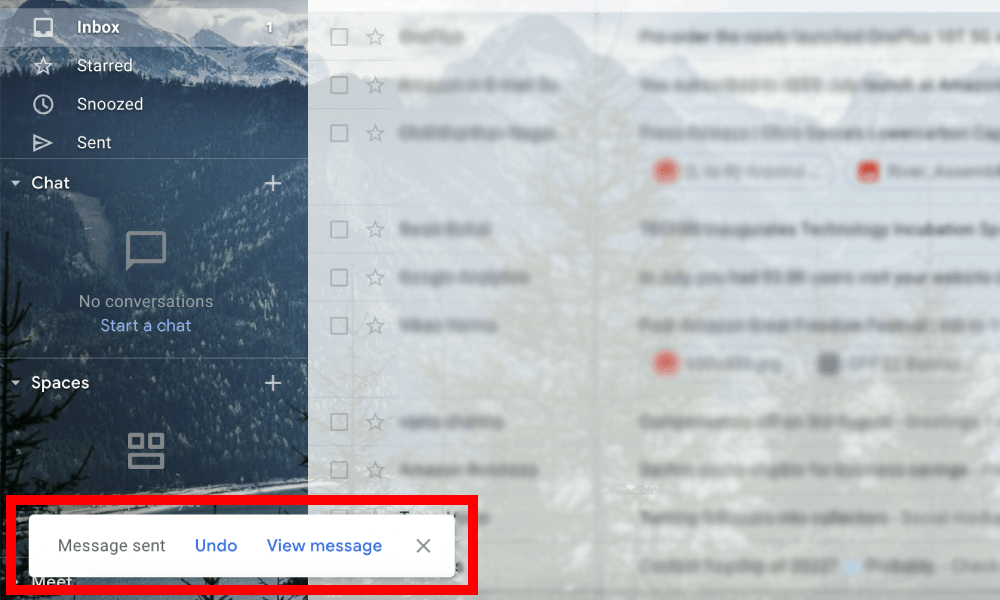
  1. As soon as you hit the ‘Send’ button on the Gmail app or web browser, you are notified with a “Message sent” alert at the bottom along with “Undo” or “View Message” options.
  2. Immediately tap on the “Undo” option to unsend the email. The option will be there for the set time you have chosen to unsend a mail.
  3. The action will take you back to the compose mail window where you can either update the changes to send it again or save a draft or delete them.
ALSO READ: Gmail Template: How To Enable, Create, Delete & Overwrite Gmail Template?

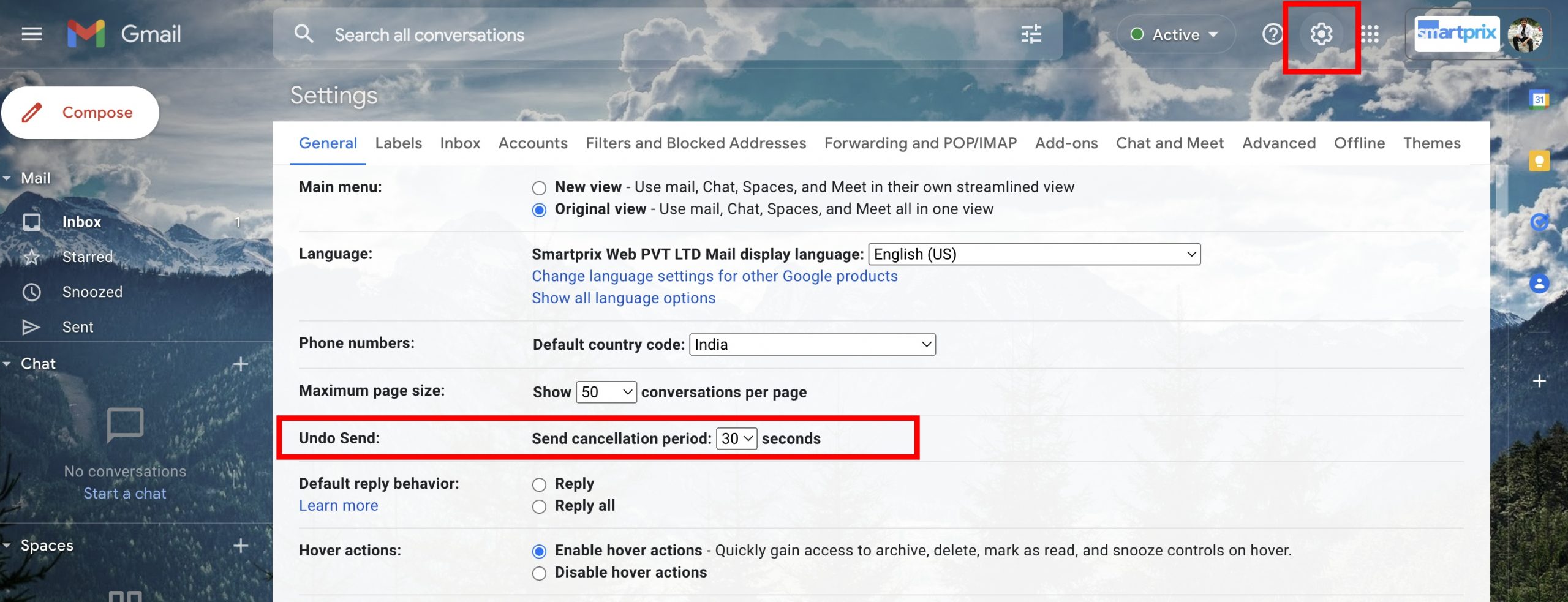
The good part is that Google allows users to set the time frame to unsend the mail. By default, it is set to just 5 seconds but users can choose the time like 5, 10, 20, or 30 seconds. Here’s how to set unsend mail timing.

  1. Go to your Gmail account through a web browser on your computer. 
  2. Click on the settings icon in the right upper corner and tap the ‘See all settings’ option.
  3. Head to the ‘Undo Send’ option under General settings.
  4. Select the cancellation period of your choice from 5, 10, 20, or 30 seconds.
  5. Scroll down and click on the ‘Save Changes” button to finally set the timing. 
ALSO READ: WhatsApp Tricks: How to send Whatsapp message without saving a number

As of now, Google allows users to cancel a send mail within 5 seconds for Android and iOS Gmail apps. Also, it doesn’t let users change it. 

Tell us in the comments below if you find this trick useful and don’t forget to share it with friends you wish should know this.

Sachin Deo VermaSachin Deo Verma
Sachin covers technology news at Smartprix and he also has a keen interest in automobile and electric vehicles. He keenly gains knowledge from various sources to be updated with the latest tech trends. He is also a passionate Potterhead who dabbles in literature, and poetry, and loves to travel.

Related Articles

ImageGlobal X (Formerly Twitter) Outage Affects Thousands Of Users Per Down Detector

Elon Musk’s microblogging platform X (formerly Twitter) appears to be down for many users at 7:15 PM IST on February 16, 2026. Users are facing trouble in loading the home page feed, accessing Twitter accounts, or simply opening the app and website. Also Read: OPPO Find X10 Series Could Get Built-In Magnets, New Leak Suggests …

ImageGmail signature: How to create a signature for every email on your Gmail account

No matter whether you’re an individual, or a small or large company, Gmail is one of the most popular email providers all around the globe. Because its infrastructure wasn’t enough to provide customers with 1GB of storage back in 2004 during the launch, the technology community is now enthralled with its rich host of features. …

ImageGoogle’s Gmail uses TensorFlow to Block 100 Million Spam Messages Everyday

Google takes the use of Tensorflow, a home-grown and open-source machine learning (ML) framework to fix Gmail’s Spam problem. Gmail hitherto features traditionally standard anti-spam system, which fails to counter the issue effectively. So, it seems the Silicon Valley giant has come forth with advanced built-in security protections. ALSO READ: Google’s Instant Tethering now available on more devices The …

ImageWhatsApp Gets New Year 2026 Features Ahead of Celebrations

Just before the New Year celebrations, WhatsApp has rolled out special New Year features. The company knows this is the time when people use the app the most to connect with their loved ones. Users keep messaging till late at night and stay connected through video calls. Due to this heavy usage, WhatsApp brings festive …

Imagerealme 16 Pro 5G Confirmed to Feature Dimensity 7300-Max SoC & 144Hz AMOLED Display

Ahead of the official launch event on January 6, 2026 (at 12 PM IST), realme India has unveiled some details about the realme 16 Pro 5G. Initially, the handset was said to feature a MediaTek chip; now we also know the model and its benchmark scores. In addition, the battery capacity has also been revealed. …

Discuss

1 Comment
T narsimulu Narsimulu t
@tnarsimulu_xocaqoji
2 years ago

Good morning madam mounikagaru

Reply