Samsung recently made the One UI 6 Watch Beta available, opening it up to users in the US and South Korea on June 12, 2024. This update marks a significant redesign for One UI Watch, introducing a host of new features and improvements to enhance the user experience.
Currently available for the Galaxy Watch 6 Series, the beta is expected to roll out soon to the Galaxy Watch 5 Series as well. Thanks to Buliga Cristian, we’ve managed to get a glimpse of all the exciting features and changes coming to One UI 6 Watch. Here’s a rundown of some of them:
1. Revamped App Drawer
The app drawer now features a transparent background with a blur effect. Previously, it had black background with no blur or transparency, so this visual upgrade offers a cleaner, more modern look. Hopefully, this feature will make its way to the Galaxy Watch4 and Watch5 series as well.

2. New Default Font
One UI 6 Watch features a new default font—Samsung One UI Sans. This is the same default font that we have on One UI 6. The new font looks cleaner and more aesthetically pleasing when compared to Roboto that we have on One UI 5 Watch.

3. New Find My App
The new Find My app on One UI 6 Watch will let you locate your Samsung phone, watch, tablet, and Galaxy Buds. This feature simplifies finding lost devices directly from your wrist.

4. Updated Graphics for Tiles
Several tiles have received graphical updates, including those for Galaxy Buds, battery, workout, weather, steps, heart rate, sleep, and stress. The ECG tile has also been revamped, providing a more visually appealing icon.

5. Emoji Quick Reply
One UI 6 Watch allows you to reply with emojis. Previously, you could only send text quick responses. Now, you can send and customize emojis, with five default options and the ability to add more. Also, these are the same emojis found in One UI 6.

ALSO SEE: Snapdragon 7 Plus Gen 3 Mobile Phones Price List 2024
6. Enhanced Animations
Samsung has optimized various animations for a smoother experience. The charging animation, screenshot animation, and transitions between app screens and the watch face have all been improved for fluidity.
- Charging Animation – The clock smoothly transitions into the charging info screen when placed on charge.
- Screenshot Animation – A smooth transition effect.
- Button Animation – Displays a smooth animation of the bezel popping into the screen when you press the buttons.
- Quick Settings Panel – Dropping the quick settings panel from the top is now smoother.
- App Screen to Watch Face Transition – Pressing the home button now zooms the app out smoothly to reveal the watch face.
7. New Gestures
One UI 6 Watch adds several new gestures, including a double pinch to perform actions, shake to dismiss notifications, and knock-knock actions. This is similar to what we have on the Apple Watch but with more options than just a pinch or double tap. Here are a few things that you can do:
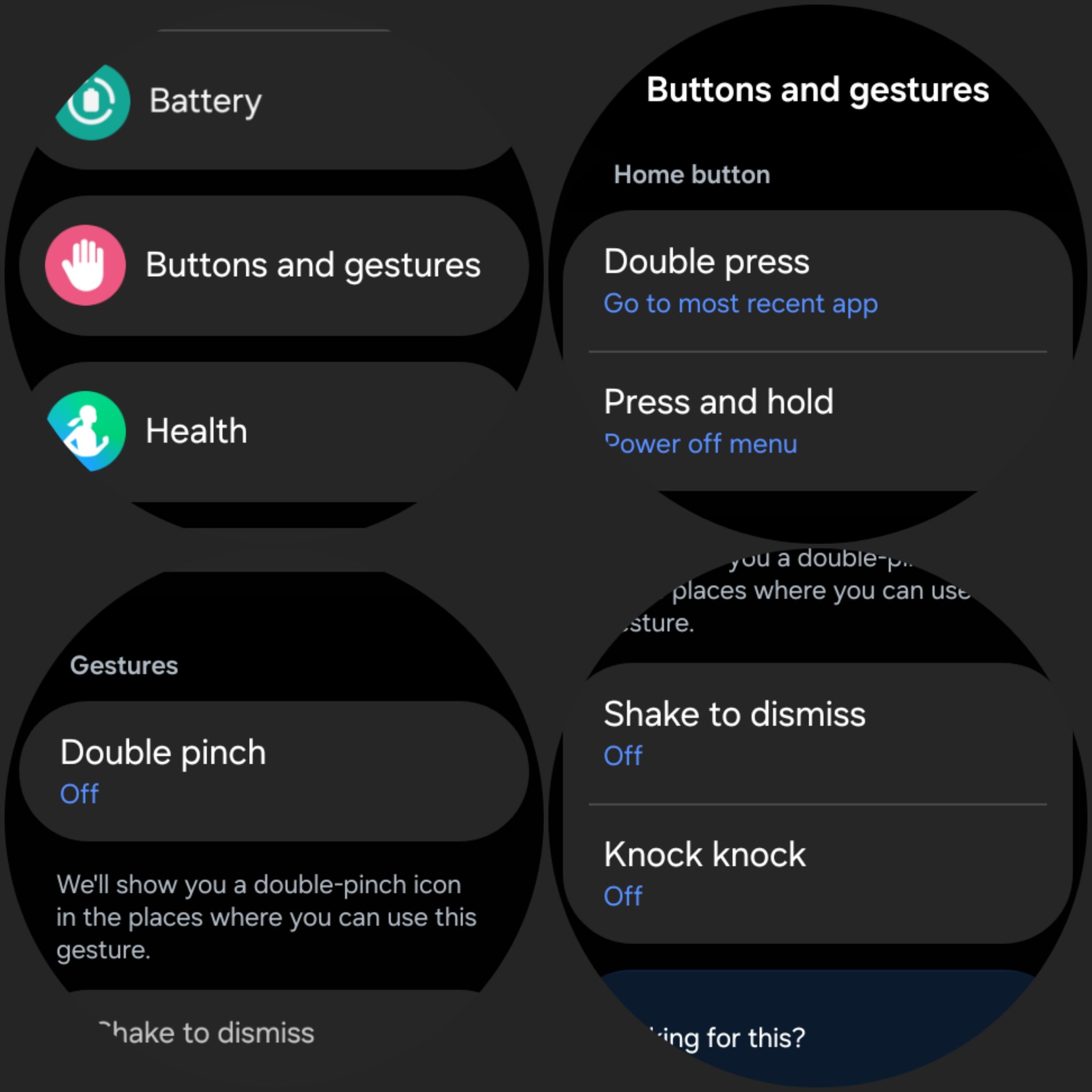
- Turning Off Alarms
- Answering Calls
- Scrolling Through Notifications
- Controlling Music
- Taking Pictures
- And more
8. Sleep Apnea Detection
The Samsung Health Monitor app now includes Sleep Apnea detection alongside existing ECG and blood oxygen monitoring.

9. Improved Blur Effects
Blur effects have been added to notification pop-ups, enhancing the visual consistency and the user experience.
ALSO SEE: Best Mileage BMW Cars in India 2024
10. Touch-Sensitive Always On Display (AOD)
The AOD is now touch-sensitive, which means that you can now interact with your watch without waking up the screen first. Simply swipe or do anything on the AOD without having to wake up the screen.
11. Check Your Body’s Battery Level
The Galaxy Watch will now show an energy score, indicating your body’s battery level to help you plan your day better.
12. Changes to Galaxy Wearable App
The Galaxy Wearable app now features a redesigned UI, making it easier to navigate Watch Faces, App Screens, Tiles, and Quick Panel. The app also adjusts the watch display based on how you wear it: if on your left wrist, buttons appear on the right side; on the right wrist, buttons switch to the left side.

Coming Soon
These features are just the beginning. One UI 6 Watch will first be seen on the upcoming Galaxy Watch 7 Series, Galaxy Watch Ultra, and Galaxy Watch FE, and then hit older models like the Galaxy Watch 4, 5, and 6 Series later this year.
Are you excited about these new features? Personally, I’m very excited about this update since it brings much awaited features and smoothness to One UI Watch. Let us know in the comments below!
ALSO SEE: Snapdragon 8s Gen 3 Mobile Phones Price List 2024
You can follow Smartprix on Twitter, Facebook, Instagram, and Google News. Visit smartprix.com for the latest tech and auto news, reviews, and guides.